Quick answer: Most real estate AI works behind the scenes for agents. AI voice narration puts AI on the front end, for the buyers and sellers who visit your site. It adds a Listen button to featured listings and blog posts. Visitors tap it and hear the written text read aloud by an AI voice. On Virtual Results agent websites it’s an optional add-on, expected to cost $25–$50 a month, and the audio updates itself when you edit.
Here’s what real estate agents are up against today: buyers aren’t sitting at a desk with a cup of coffee and time to spare. They’re scanning listings between appointments, commuting, or sprawled on the couch at 11 p.m. with one eye open. If your listings can only be read, you’re already losing a slice of their attention.
We built a fix for that.
AI voice narration is now live on select Virtual Results agent websites (see how text-to-speech for real estate websites works). Visitors tap Listen on your listings and blog posts and hear your content read aloud — no apps, no extra downloads. This is the kind of feature that’s lived exclusively on big national-brand platforms with dedicated engineering teams and seven-figure tech budgets. We’ve made it available to individual agents, brokers, and teams anywhere in the U.S. for an expected $25–$50 a month.
AI that works for your buyers, not just for you
Most of the AI in real estate tech works behind the scenes for agents. It scores leads, drafts listing descriptions, schedules follow-ups and targets ads. Useful stuff, but your buyers and sellers never see it.
Voice narration points AI at the other side of the screen. It serves the people who visit your website: the buyer listening to a listing on the drive home, the seller catching your market update while dinner cooks. You benefit too, because it works like marketing automation. The audio is created and refreshed for you, so your content reaches more people in more ways without adding a single task to your day.
Front-end AI like this is uncommon on agent websites. As far as we’re aware, this is the first time AI voice narration has been offered to individual agent websites at this price point.
Tap Listen. This is the real thing.
Two narrations created automatically on a live agent website. Nobody recorded a word.
Try it yourself
2117 5 Avenue, Harlem
4 Family, plus 6 SRO’s, a total of 10 apartments with a yearly income of $252,000 and ideally situated in the lively central side of Harlem! This professionally curated space offers a perfect blend of contemporary comfort and convenience. Enjoy modern amenities, a prime location.
Saved example from Keller New York. Listing courtesy of Keller Williams Realty NYC Grp.
Your Dream Kitchen Could Be a Very Expensive Gift to the Next Owner
You pay for the renovation. They get the Sunday breakfasts. The resale math makes that arrangement even less appetizing.
Saved example from the Keller New York blog.
Here’s what this post covers:
- What AI voice narration actually does on your site
- Who benefits — and why it’s a bigger list than you’d expect
- How the system becomes more efficient as more agents use it
- Why this matters for web accessibility
- How to get it turned on
What Is AI Voice Narration for Real Estate Websites?
It’s a Listen button because your content deserves to reach people in more than one way. The feature converts your written listing descriptions and blog posts into natural-sounding audio that plays directly on the page. Clean. Frictionless. No extra steps for your visitor.
Where the player lives

- On listings: A Listen/Pause player sits right beside the Description on qualifying listings — including inside the listing modal for visitors who preview without opening the full page.
- On blog posts: The player appears next to your reading-time estimate, giving visitors an immediate choice: read or listen.
- During playback: A progress timeline appears, not unlike a podcast player embedded right into your site.
What gets narrated
Narration generates automatically for qualifying Active featured and exclusive listings and your blog posts — the content that works hardest on your site.
What it asks of you
Nothing. No recording. No voiceover artist. No audio files to upload or manage. The system runs quietly in the background while you focus on your clients.
Bottom line: Your listings and blog posts now have a voice. You didn’t have to produce a thing.
How It Works Behind the Scenes
You don’t need to understand the technology to benefit from it. But a few details are worth knowing, because they directly affect how the feature fits into your day-to-day.
It updates when your content does
Change a listing price, tighten a description, or update a blog post — the narration refreshes automatically.
There’s a built-in two-hour buffer after each edit before new audio generates. Another edit during that window resets the timer. That means a quick round of revisions won’t trigger a separate recording for every line you touch. The system waits until you’re done, then gets to work.
It doesn’t touch your site’s performance
Audio is served separately from your pages, so page caching is unaffected. The player is also fully responsive on mobile — which matters, because that’s where a significant portion of your visitors are browsing.
It’s easy to remove
If you ever want to turn it off, that’s a single setting in your site dashboard. Your content, your headings, your structure — all of it stays exactly as it is.
One honest caveat
The voice sounds natural, but AI narration can stumble on unusual street names or hyperlocal references. This isn’t unique to us — even major national publishers flag occasional pronunciation errors in their own read-aloud features. After launch, take a few minutes to listen to your own pages, particularly any listings with non-standard addresses or neighborhood names.
Bottom line: It stays current, stays fast, and stays out of your way.
Who Actually Benefits
You, the agent
You get enterprise-level website functionality because you’ve been operating without it for too long — not due to lack of ambition, but due to lack of access. A Listen button on your listings signals to every visitor that your site is built for how people actually live.
As far as we’re aware, this is the first time AI voice narration has been made available to individual agent websites at this price point. It’s available to agents, brokers, and teams across the U.S.
Your buyers and sellers
Your clients now have more ways to engage with your content on their own terms:
- Multitaskers can listen while cooking, running errands, or folding laundry.
- Commuters can catch up on listings without staring at a screen.
- Out-of-state buyers can absorb neighborhood guides and property details during downtime, whenever that comes.
- Anyone with tired eyes after a long day of house-hunting gets a real alternative.
Visitors who need audio access
For some visitors, a listen option isn’t a convenience — it’s a requirement. More on that in a moment.
Bottom line: One button. A broader reach. More of your content, consumed.
The Network Effect: Why It Gets Stronger as More Agents Join
This is worth understanding, because it’s genuinely different from how most technology pricing works.
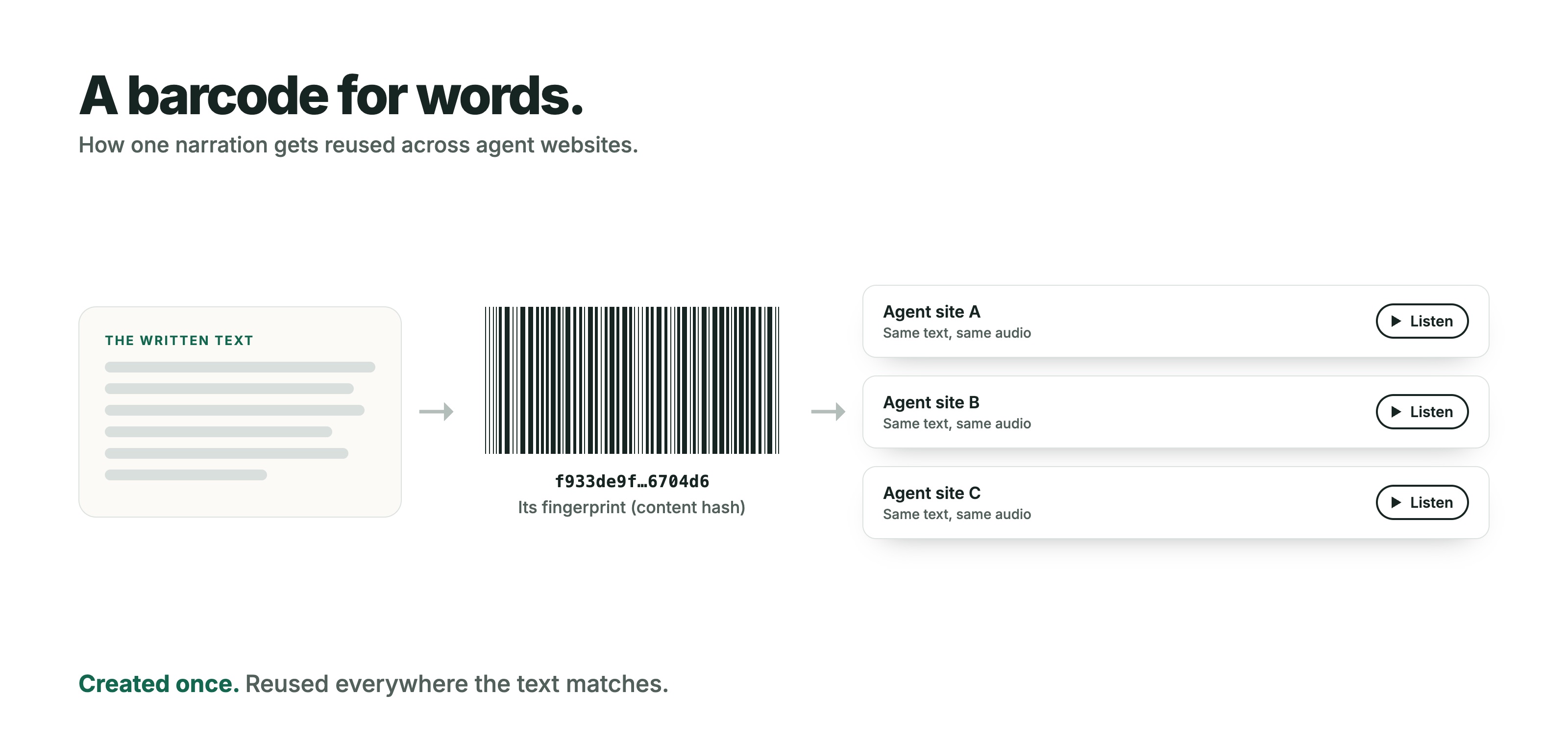
Every piece of content gets a digital fingerprint
Each narrated text block is assigned a unique fingerprint through a process called content hashing — essentially a barcode for words. When that exact text appears on more than one agent’s site, the system recognizes the match and reuses the audio that already exists. No redundant generation.
Shared audio, shared efficiency
Fewer unique audio files to create means a leaner, faster system overall. As more agents adopt the feature, the pool of shared content grows. That’s a network effect that benefits every agent on the platform.
Owned infrastructure keeps costs grounded
There’s a practical reason this can be offered at an individual-agent price point. Virtual Results made a deliberate decision several years ago to move off rented cloud servers and invest in its own hardware. Since then, AI demand has driven serious pressure on hardware supply and pricing worldwide. Owning that infrastructure before the crunch hit is a significant reason this feature is priced the way it is. We’re not paying cloud compute rates for every synthesis — and that savings passes through to you.
Bottom line: Shared fingerprints plus owned infrastructure equals enterprise-grade features without enterprise-grade overhead.
Why Accessibility Makes This More Than a Feature
The W3C’s Web Accessibility Initiative puts it simply: text-to-speech is “essential for some, useful for all.” That framing matters. (We dig into this in why AI voice narration matters for real estate websites.)
Who it serves most directly
Audio narration removes a real barrier for:
- People who are blind or have low vision
- People with dyslexia and other cognitive or learning differences who benefit from hearing and seeing content together
- People for whom reading in English is difficult
- Anyone dealing with visual fatigue who simply needs a different mode
That last category covers more of your visitors than you might expect — and it includes people in the middle of one of the most high-stakes decisions of their lives.
What it is, and what it isn’t
Narration adds another way to experience your content. It works alongside existing assistive technology — screen readers, for instance — rather than replacing it. And by itself, it doesn’t make your site fully compliant with accessibility standards; that depends on your site as a whole.
What it does is move the needle. And our hope is that it pushes the rest of the real estate industry to move it too.
Bottom line: Some visitors need audio to access your content. Everyone else appreciates having the option.
A Word from Our President
Ryan Rockwood, President of Virtual Results, on why this launch matters:
“Most agents gave up on this kind of technology years ago. They figured it belonged to the national brands with the giant budgets. We didn’t accept that. Now the solo agent working from her kitchen table gets the same tech as the biggest names in real estate — for less than her phone bill.”
That’s the whole point of this company. And this feature.
How to Get It Turned On
There’s no complicated onboarding here. Here’s the sequence (the full walkthrough is in how to use text-to-speech on your real estate website):
- Contact your Virtual Results account team. They’ll confirm your site’s eligibility and walk you through pricing based on your listing volume.
- After your account team activates narration for your site, toggle “Activate” on the voice narration option in your website settings. The option won’t appear there until then.
- Let it run. Qualifying Active featured and exclusive listings and your blog posts begin generating narration automatically.
- Listen to your own pages. Spend a few minutes testing listings and posts — especially anything with unusual addresses or neighborhood names.
- Keep editing as you normally would. Narration updates itself after the two-hour buffer window.
Tell your clients it’s there
A feature doesn’t help anyone if nobody knows it exists. Add a line to your next listing email. Mention it in your newsletter. Demo it live during your next listing appointment or buyer consultation. “Tap Listen and the site will read it to you” is about as simple an explanation as it gets — and it tends to land.
Quick FAQ
How much does it cost?
An expected $25–$50 a month, depending on listing volume. Your account team will confirm your exact pricing.
Do I have to record anything?
No. Audio is created automatically for qualifying listings and blog posts.
What happens when I update a listing or blog post?
Narration refreshes automatically after a two-hour buffer. Additional edits during that window restart the timer.
Can I turn it off?
Yes — from your site settings, at any time. Your content stays intact.
Is it an add-on?
Yes. Voice narration is optional. Your account team activates it for your site first, then the option appears in your website settings.
Give Your Website a Voice
Your listings and blog posts carry your brand around the clock. Now they can carry your voice, too — automatically, affordably, and in a way your clients will actually notice.
Reach out to your Virtual Results account team today to get AI voice narration enabled on your site. Your next visitor might just hit play.
Keep reading
- AI voice narration for real estate websites: features, pricing and a live demo
- How to use text-to-speech on your real estate website
- Why AI voice narration matters for real estate websites
- The accessibility angle: what text-to-speech can and can’t do for real estate websites
- Behind the build: how we built AI voice narration
Sources and further reading
- W3C Web Accessibility Initiative: Text to Speech — the source of “essential for some, useful for all”
- Columbia Journalism Review: how major publishers adopted AI narration — 2026
- NPR: the BBC’s AI voice that reads articles aloud — 2020