Quick answer: AI voice narration reads a real estate website’s listing descriptions and blog posts aloud, which helps people who are blind or have low vision, people with dyslexia, people reading in a second language and anyone whose eyes are busy or tired. It works alongside screen readers, not instead of them, and it doesn’t make a site ADA or WCAG compliant on its own. Treat it as one useful piece of an accessible real estate website, not the whole job.
Picture a buyer squinting at a 300-word listing description on her phone. She zooms in, loses her place, scrolls back up and tries again. Or picture a seller who reads English well but thinks in Spanish, and wants to be sure he caught every detail of your marketing plan. Neither of them will email you to say the website was hard to use. They’ll just leave a little less impressed.
That’s the accessibility angle on text-to-speech for real estate websites. It isn’t the flashiest reason to add a Listen button, but it might be the best one. Here’s what narration can do for a more inclusive web, where it stops, and what else belongs on your list.
Tap Listen. This is the real thing.
Two narrations created automatically on a live agent website. Nobody recorded a word.
Try it yourself
2117 5 Avenue, Harlem
4 Family, plus 6 SRO’s, a total of 10 apartments with a yearly income of $252,000 and ideally situated in the lively central side of Harlem! This professionally curated space offers a perfect blend of contemporary comfort and convenience. Enjoy modern amenities, a prime location.
Saved example from Keller New York. Listing courtesy of Keller Williams Realty NYC Grp.
Your Dream Kitchen Could Be a Very Expensive Gift to the Next Owner
You pay for the renovation. They get the Sunday breakfasts. The resale math makes that arrangement even less appetizing.
Saved example from the Keller New York blog.
What does AI voice narration do on a real estate website?

AI voice narration turns the written words on a page into audio that a visitor can play with one tap. On select Virtual Results agent websites, an optional Listen button can appear on the website’s Active featured and exclusive listings and on blog posts. A natural-sounding AI voice then reads the text aloud.
The audio refreshes 2 hours after your last edit, and another edit restarts that timer, so a price change won’t leave stale audio behind for long. The audio is also served separately from the page, so your page caching isn’t affected.
For visitors, listening is free. There’s no app and no extra download, though a free account signup may be required. If you want the full product rundown, start with our overview of AI voice narration for real estate agent websites, or see the main text-to-speech for real estate websites page.
Who does text-to-speech help?
Text-to-speech helps far more people than most agents assume. The W3C’s Web Accessibility Initiative puts it simply in its Text to Speech perspective video: “Web accessibility: Essential for some, useful for all.” It lists people who are blind, have low vision or dyslexia, or are multitasking as everyday users.
People who are blind or have low vision
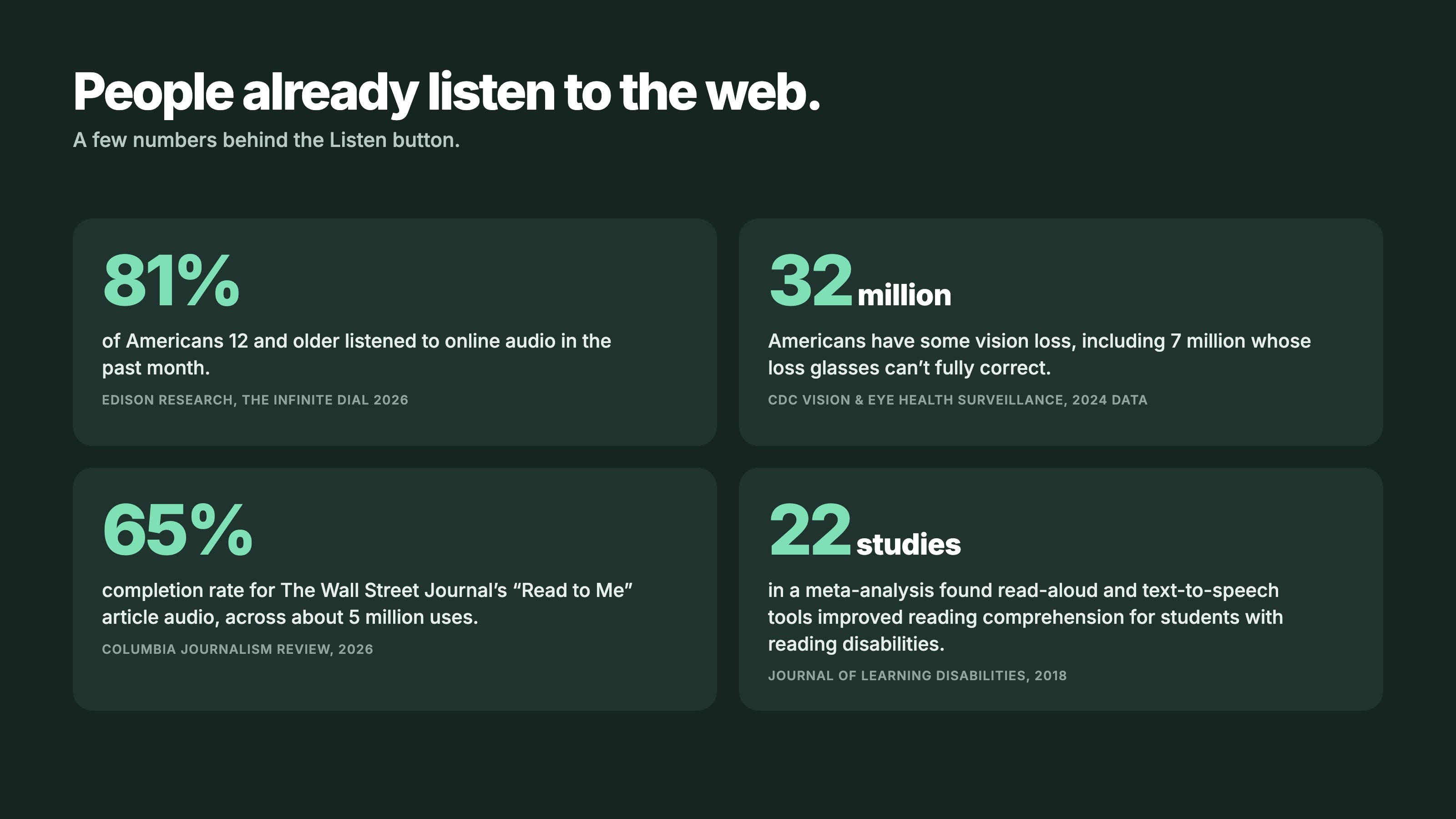
This group is larger than you might think. According to the CDC, about 32.17 million people in the U.S. (9.46%) had vision loss in 2024, and 7.15 million had vision loss that glasses can’t fully correct. Some of them are shopping for homes right now.
Many people who are blind already use screen readers, which WebAIM, a non-profit at Utah State University, describes as software that converts text to synthesized speech. But not everyone with low vision uses one. The American Foundation for the Blind notes that some people with partial sight find listening more productive than reading close to the screen. A Listen button gives them that option without any setup.
People with dyslexia and other reading differences
Dyslexia Scotland lists text-to-speech, which reads on-screen text aloud, as a recommended support. The research backs that up, with some honest nuance. A 2018 meta-analysis by Wood et al. in the Journal of Learning Disabilities looked at 22 studies and found that read-aloud and text-to-speech tools improved reading comprehension for students with reading disabilities (average effect d = .35).
For readers in general, the boost is smaller. A 2023 meta-analysis by Clinton-Lisell found a small overall benefit from reading while listening (g = .18). So narration isn’t magic. It helps most for the people who struggle most with dense text, and listing descriptions can get pretty dense.
People reading in a second language
Plenty of buyers and sellers speak English well but read it more slowly than their first language. Hearing a description while following the text can make it easier to catch details like “HOA fee includes water” or “seller to credit closing costs.” It doesn’t translate anything, but it gives a second path to the same words.
Tired eyes and busy hands
Then there’s everyone else. The buyer whose eyes are done after eight hours of spreadsheets. The seller who wants to hear your latest blog post while cooking dinner, or while driving with eyes on the road. These are situational limits, and most of us hit them some days.
Is a Listen button the same as a screen reader?
No. A Listen button works alongside screen readers, not instead of them. WebAIM explains that screen readers are used by blind and low-vision users, some people with cognitive or learning disabilities, and people who simply prefer audio. They read the whole interface, including menus, buttons, links and forms.
Narration does something narrower. It reads the main written content of a listing or blog post in a natural-sounding voice, start to finish, with one tap. A screen reader user can keep using their own tool the way they always do. The Listen button is labeled for screen readers (“Listen to audio narration”), so it announces itself clearly instead of showing up as a mystery button.
So who benefits most? Mostly people who don’t use a screen reader at all: the low-vision visitor who’s been zooming, the reader with dyslexia, the tired buyer at 11 p.m.
Does narration make a real estate website ADA or WCAG compliant?
No, and anyone who tells you a single feature does should make you nervous. The Department of Justice’s 2022 web accessibility guidance explains that inaccessible web content can deny people with disabilities equal access, and notes that blind users rely on screen readers to use websites. Equal access depends on how the entire site is built, not on one button.
Real estate website accessibility comes from the whole site working together: alt text on images, a sensible heading structure, enough color contrast, keyboard navigation, usable forms and captions on video. The widely used standard is the Web Content Accessibility Guidelines (WCAG), and the current version is WCAG 2.2, published in October 2023.
AI voice narration is a helpful extra on top of that foundation. It’s not the foundation, and we’d rather you hear that from us.
What’s on an accessibility checklist for your real estate website beyond narration?
A good accessibility checklist for your real estate website starts with the content you touch every week. WCAG 2.2 covers far more, but these habits go a long way.
- Alt text on listing photos. “Kitchen with white quartz counters and a large island” tells a screen reader user something. “IMG_4471” tells them nothing.
- Descriptive link text. “See the floor plan for 412 Oak Street” beats “click here,” which sounds identical to every other “click here” on the page.
- Color contrast. Light gray text on a white background looks sleek and reads poorly. Make sure text stands out clearly from its background.
- Captions on video tours. Captions help people who are deaf or hard of hearing, plus anyone watching with the sound off in a waiting room.
- Readable PDFs. A scanned image of a disclosure or neighborhood guide can’t be read by assistive technology. Use text-based PDFs, or put the key information right on the page.
- Accessible contact forms. Every field needs a clear label, error messages should say what went wrong, and the form should work with a keyboard alone.
None of this is glamorous. All of it makes the site better for everyone.
Why does accessibility matter so much in real estate?
Buying or selling a home is one of the biggest decisions most people ever make. When the information is hard to reach, the stakes are a lot higher than a frustrating checkout page. The W3C’s line, “Essential for some, useful for all,” from its Text to Speech page, fits housing especially well.
There’s also the spirit of fair housing: everyone deserves an equal shot at finding and getting a home. We’re not giving legal advice here, and your broker or attorney is the right source for specific obligations. But making listing details easier to reach for more people lines up with why most agents got into this business in the first place.
For a deeper look at the business side, read why AI voice narration matters for agents.
How do you talk about narration with clients?
Quietly. You don’t need a press release or a “now accessible!” banner, and given everything above, you shouldn’t make claims like that anyway. The best moment is a listing appointment or buyer consultation, when you’re already showing someone your website.
For sellers: “Your listing will have a Listen button, so buyers can hear the description read aloud.” For buyers: “If you get tired of reading listings on your phone, tap Listen.” That’s it. People who need it will remember, and everyone else will think it’s a nice touch.
One thing worth mentioning to your peers, maybe not your clients: narration like this is rare in real estate. You’ll mostly find it on large publisher and enterprise sites, and ours is the first we’re aware of at this price point.
“Most agents gave up on this kind of technology years ago. They figured it belonged to the national brands with the giant budgets. We didn’t accept that. Now the solo agent working from her kitchen table gets the same tech as the biggest names in real estate — for less than her phone bill.”
— Ryan Rockwood, President, Virtual Results
What does it cost, and how do you turn it on?
Voice narration is an optional add-on with an expected $25–$50 a month, depending on your listing volume. It gets more efficient as more agents join. Setup takes two steps: one quick call where the account team activates it and explains what to expect, then you switch it on yourself.
After activation, go to your website settings and toggle “Activate” on the voice narration option. The option won’t appear until the account team has activated it, so don’t worry if you can’t find it yet. Our guide on how to use AI voice narration on your agent website walks through it, and the text-to-speech for real estate websites page has the full details.
Want a Listen button on your listings and blog posts? Talk to your Virtual Results account team and they’ll walk you through what to expect.
Keep reading
- Text-to-speech for real estate websites: features, pricing and a live demo
- Why AI voice narration matters for real estate websites
- How to use text-to-speech on your real estate website
- Behind the build: how we built AI voice narration
Sources and further reading
- W3C Web Accessibility Initiative: Text to Speech
- W3C: Web Content Accessibility Guidelines (WCAG) Overview
- WebAIM: Screen Readers
- U.S. Department of Justice: Guidance on Web Accessibility and the ADA (2022)
- American Foundation for the Blind: Screen Readers
- Dyslexia Scotland: Assistive Technology
- CDC: Vision Loss Prevalence Estimates
- Wood et al. (2018), Journal of Learning Disabilities: text-to-speech and read-aloud meta-analysis
- Clinton-Lisell (2023): Reading While Listening meta-analysis