
You have explained the preparation, the pricing, the marketing and the next steps. The seller nods. Then, as you put your materials away, they ask, “So when do the photos happen?”
That question is a helpful signal. You covered the work, but the seller may still be assembling the picture in their head.
A real estate listing presentation becomes easier to follow when the important relationships are visible. Show what depends on what. Separate a price discussion from a proceeds discussion. Give the seller a place to see their questions without making every slide another list.
The Real Estate Visualization Library includes 78 original diagrams you can explore, save and customize. Here are seven ways to use them in a listing meeting, with a different job for each visual.
What should a listing presentation explain?
A useful listing presentation helps a seller understand your proposed work, the evidence behind a pricing discussion, the preparation ahead, the way the home will be presented and how you will review progress together.
It should also leave room for the seller’s priorities. A homeowner who needs a predictable move has different questions from one deciding whether to sell at all. Begin with those questions and choose the pictures that help answer them.
You may only need three of the seven ideas below in a particular meeting. Keep the others close enough to open when the conversation reaches them.
1. Make the preparation work visible
“Get the house ready” sounds like a single task until someone starts doing it. Cleaning, repairs, access, photography and factual review have different owners and timing.
What “get the house ready” actually contains breaks the broad assignment into smaller pieces. Use it to ask, “Which of these is already handled, and where do we need a plan?”
A hierarchy fits because you are unpacking one large idea. It does not show how long each task takes. If the seller’s question is about timing, follow it with the schedule view rather than loading dates into every branch.
Meeting tip: write down who will handle the next task while the seller can still see the picture. A clear owner is more useful than another encouraging phrase about preparation.
2. Explain why photography has prerequisites
Suppose the dining room still contains moving boxes and the photographer is booked for Thursday. This illustrative scenario has a visible dependency: the room needs to be ready before it can be photographed as planned.
Photography depends on preparation shows those connections directly.
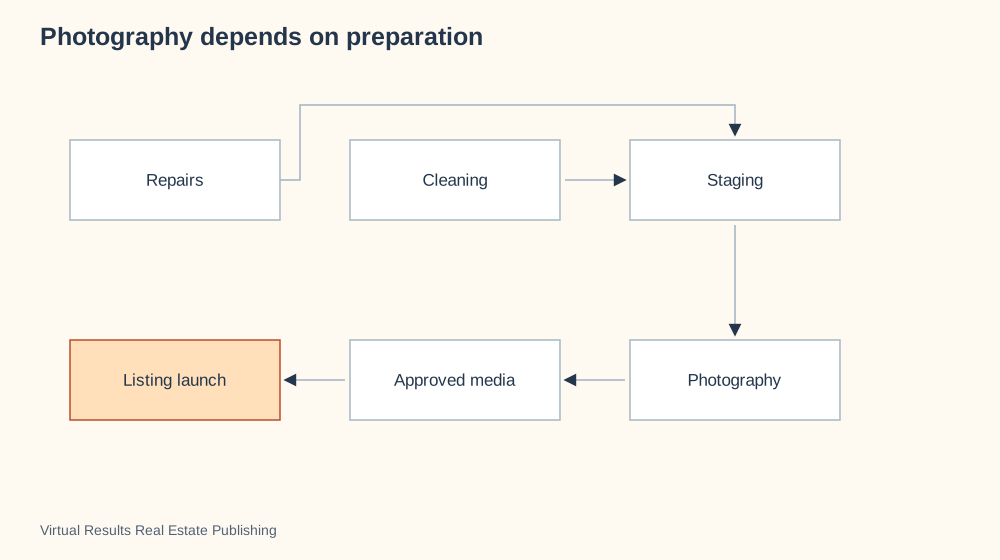
A dependency diagram answers what needs to happen first. A calendar answers when. Keep that distinction clear: the arrows do not estimate the duration of a repair or promise a completion date.
Ask the seller which item could hold up the plan. Then turn the answer into a confirmed task, owner and date in your working schedule.
3. Put the pricing reasoning on a foundation
A proposed price feels less arbitrary when the seller can see the reasoning beneath it.
A pricing opinion needs a foundation uses a pyramid to connect property facts, comparable evidence, market context and the pricing discussion.
The pyramid fits a supported argument. It does not mean that the width of a layer measures its statistical weight. Its job is to remind you and the seller to examine the supporting information before concentrating on the conclusion.
Use it as a conversational structure: “Here is what we know about the home. Here is the evidence we selected. Here is the context. Now let’s discuss what that suggests.”
That is also a good moment to surface the seller’s questions about which homes belong in the comparison.
4. Separate sale price from estimated proceeds
Two sellers can hear the same sale price and picture very different outcomes. Expenses and individual arrangements affect the estimate they care about.
From sale price to estimated seller proceeds uses a waterfall chart to show a starting figure, deductions and a resulting estimate.
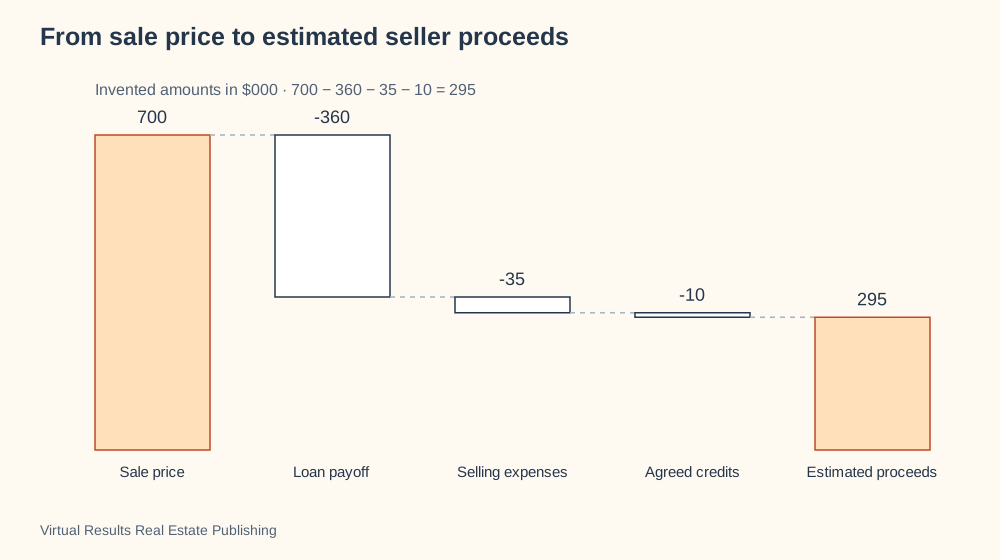
The library’s figures are sample numbers. Replace them with a clearly dated, property-specific estimate when preparing your own version. A waterfall fits additions and deductions; it does not predict the eventual selling price or make an uncertain expense final.
Pro tip: keep the estimate and its assumptions together. A beautiful chart is less useful if the seller cannot tell which amounts remain open.
5. Give the marketing plan distinct destinations
“Online marketing” can blur several different activities into one phrase. The property page, listing distribution and supporting presentations each have a purpose.
A listing launch has distinct destinations makes those destinations visible. Talk through the actual channels in your plan and the information that needs to remain consistent across them.
This map fits a discussion about where material goes. It does not measure the audience reached or establish which channel caused an inquiry. Those questions need their own evidence.
Invite the seller to ask where someone can find the full property story. That shifts the conversation from a quantity of posts to the experience a prospective buyer will have.
6. Show how feedback becomes a discussion
A comment after a showing can feel personal. A series of comments can also become noisy unless there is a way to review them.
Listen, adjust, and learn during a listing uses a cycle to connect launch, feedback, patterns, discussion, adjustments and review.
The cycle fits because review continues. It does not imply that every comment requires a change, or that a change will produce a sale.
Explain how you will distinguish an isolated preference from a pattern worth discussing. Ask how the seller would like to review updates. The picture helps make that working relationship visible before the first difficult conversation.
7. Let the seller see the whole journey
After discussing details, zoom out.
The whole seller journey in one view gives the seller a broader frame for preparation, launch and what follows. It can help connect the individual decisions to the larger experience.
A journey view is useful for orientation. It is less useful for a precise task schedule, and it should not hide the possibility that the plan changes. Finish by asking, “Where would you like more detail?” The answer is a good guide to what your presentation should do next.
Make the presentation yours
Every diagram in the library includes a customization prompt for ChatGPT, Claude or Codex. Copy the prompt, describe the seller’s question and ask your assistant to walk through the design options with you. Request a PowerPoint version with speaker notes if you want to present it as slides.
You can download the original SVGs, browse the diagram chooser, use the 32 original real estate icons or explore the browser demos and videos. Save the direct links to your favorites so you can open them with a client. The useful format is the one that makes the conversation easier to follow.
Explore the library and build a presentation around the seller’s questions. If you use or adapt a visual, please credit Virtual Results Real Estate Publishing and link back to the example. Give us some love, and give your audience a way to discover the rest.