A little behind-the-scenes from the workbench — today, the doorway your visitors never see.
Signal & Noise — Part 5 of 7
← We Built Your Website a Second Website — Just for the Robots | Are You Human? reCAPTCHA, Akismet, and the Bots We Can’t Just Block →
The short version
- A web application firewall (WAF) is a bouncer at the edge of the network — it inspects traffic before it ever reaches your site and decides: block, challenge, or allow.
- The cheap, standard setup blocks bots with a blunt instrument. Our upgraded pro plan swaps that for a smart “managed challenge” that lets verified good bots (like Googlebot) straight through and only quizzes the suspicious ones — far fewer mistakes.
- The upgraded plan also gives us a roughly 40× larger rule set (~1,034 managed rules vs. about 26 on the standard plan) — and every client we host gets it at no extra cost.
- It’s powerful enough that, once in a while, it stops the wrong person. We’ll tell you about that honestly — a whole office sharing one IP, an agent flagged right after publishing a listing.
- About 15% of the traffic hitting our edge gets blocked or challenged on our upgraded plan before it ever costs your site a thing.
↓ Skip to the long version / results
In this guide
In Part 4 we built your site a second site — a separate server just for the robots. But before traffic ever gets sorted onto one server or the other, something has to look at every visitor arriving from the open internet and decide whether to let them in at all. That something is a bouncer — and it stands at the edge of the network, long before the door to your site.
What a web firewall actually is
You’ve heard of a firewall — the thing on your router that decides which connections are allowed: ports, addresses, the plumbing layer. A web application firewall — WAF, for short — works one floor up. Instead of the plumbing, it reads the actual web request: the page being asked for, the patterns in the data, the reputation of where it’s coming from. It’s the difference between a guard who checks the door is locked and a bouncer who looks at you as you walk up. Two things make it powerful:
- It lives at the edge, not on your site. Our network spans hundreds of cities, so the firewall runs close to the visitor — a bad request gets turned away thousands of miles before it would touch your server, never costing you a CPU cycle.
- It judges the request, not just the connection. A login-page hammering, a probe for a known WordPress weakness, a scraper pretending to be a browser — all look fine to a basic firewall. The WAF recognizes them.
This is a different layer from the on-page stuff you know — the “I’m not a robot” checkbox, the contact-form spam filter. Those live inside the site and catch what slips past the door (that’s Part 6). The WAF is the door.
How it sorts the crowd
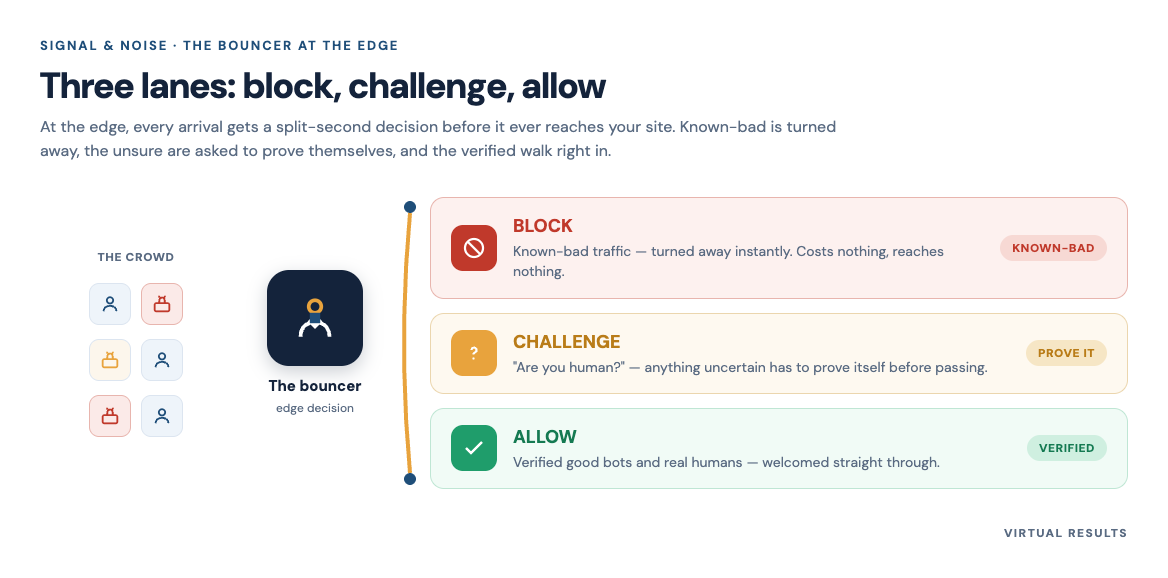
A good bouncer doesn’t treat everyone the same. Neither does the firewall. Every arriving request lands in one of three lanes:
- Block the obvious. Known-bad addresses, networks with a rotten reputation, requests matching a known attack pattern — turned away flat.
- Challenge the maybe. A suspicious but not clearly malicious request gets a quiet test — a “managed challenge” a real browser passes in the background, usually unnoticed, while a dumb script trips over it.
- Let the human (and the good bot) through. A normal visitor — and a recognized search crawler doing legitimate work — sails on to the site.
How does it decide which lane you’re in? A few signals, stacked: reputation (the edge sees a huge slice of the world’s traffic, so it knows which networks have been misbehaving); fingerprinting (real browsers behave like real browsers; scripts pretending to be browsers usually get a small detail wrong); and behavior (one visitor, fifty pages a second, isn’t a person reading listings).
Here’s where the plan you’re on matters enormously — and where most websites quietly settle for the blunt version. The standard, free-tier setup has one bot mode, essentially a switch: bot or not? If it decides “bot,” it blocks — and hard-blocks AI crawlers outright. Cheap and clumsy, because plenty of “bots” are ones you actually want.
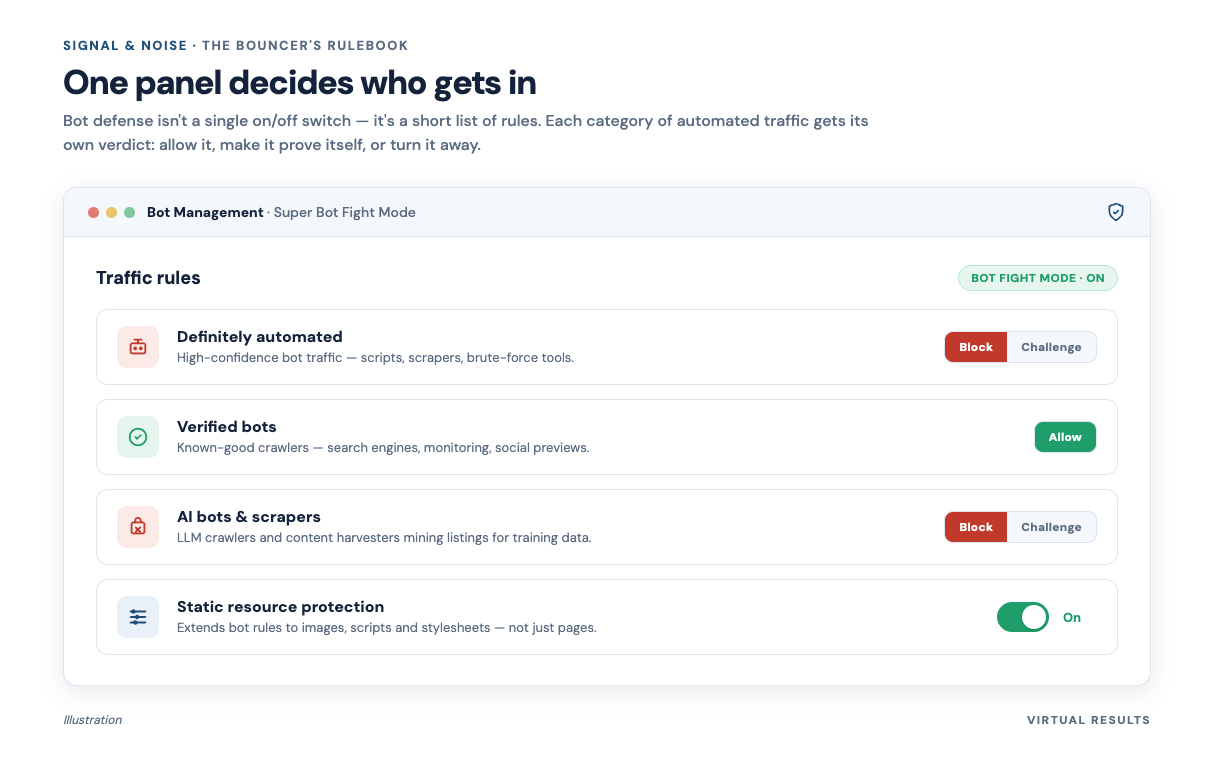
The smarter mode on our upgraded plan does better. It gives “definitely automated” traffic that quiet managed challenge instead of a wall — while verified good bots, like the search engines that index your listings, are simply allowed through. Block the bad, challenge the unknown, wave the good guys in. That distinction — challenge instead of block, plus a guest list for the crawlers that earn your living — is the whole reason a real estate site shouldn’t run the cheap version.
Why we pay for the upgraded plan
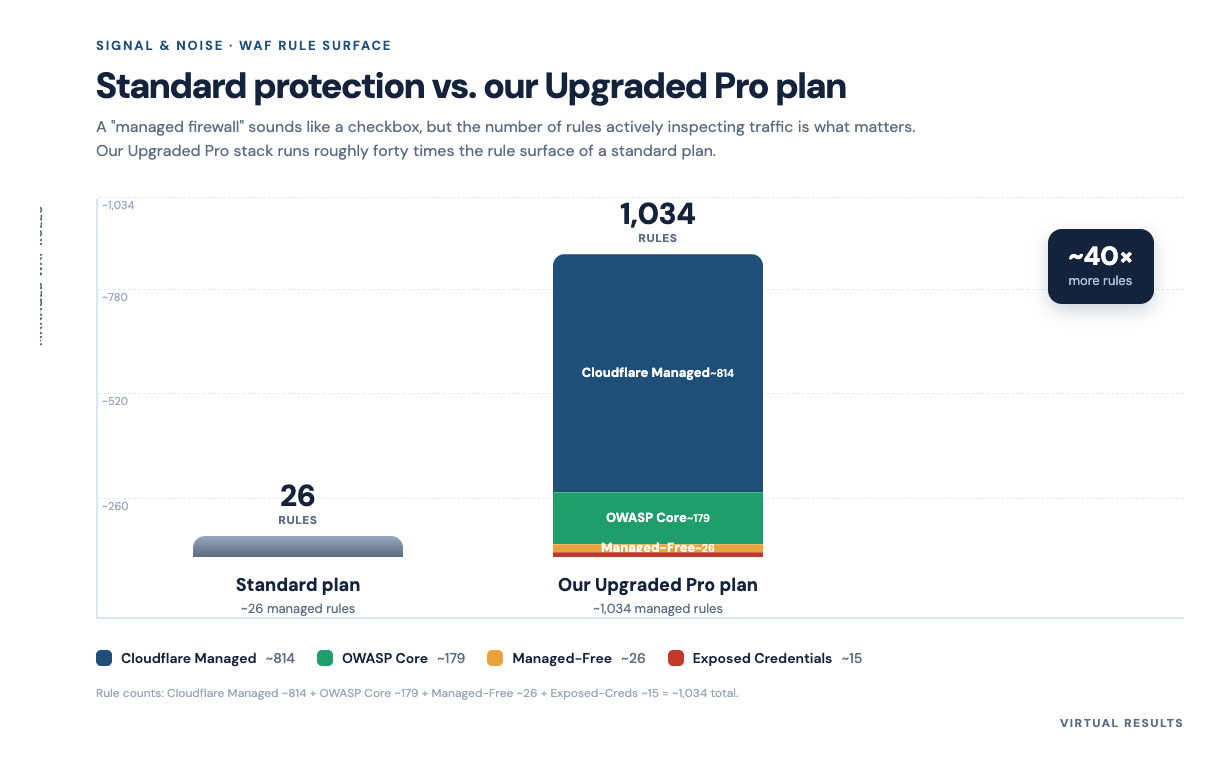
Behind that bouncer is a rulebook — and its size genuinely surprised us when we measured it. On a standard plan, the firewall ships with one managed rule set — about 26 rules. Useful, but thin. On our upgraded pro plan, it runs the full managed stack: a big core rule set, an industry-standard set maintained by the open web-security community, a managed free set, and a check that flags requests using known-leaked passwords. Add those up and it’s roughly 1,034 managed rules — about 40× larger than standard.
Practically, that protection runs in a “maximum sensible” mode: verified search engines wave through, anything definitely automated gets challenged or blocked, and AI scrapers are handled on their own track. It’s the kind of control normally reserved for higher-tier plans — and, again, every client we host gets it at no additional cost.
Forty times more rules isn’t about being forty times paranoid. It’s coverage: the upgraded set knows far more specific attack shapes — the SQL-injection tricks, the cross-site nasties, the leaked-credential lists — so more bad traffic gets stopped at the edge instead of becoming somebody’s problem later.
We also tune it. A rule set that big, run carelessly, will block things it shouldn’t — so we switch off a handful of rules notorious for tripping over normal WordPress admin work, and keep the firewall on conservative settings rather than cranking it to maximum. Aggressive enough to be safe; restrained enough to keep false alarms rare.
The part we’re quietly proud of: this isn’t a premium add-on we upsell. Every client site we host sits behind the upgraded plan. You don’t buy it or tier into it. It’s just the floor.
When the bouncer gets it wrong (the honest part)
Here’s the thing about a bouncer good enough to stop real trouble: every so often it stops a real guest. We’d rather tell you about that than pretend it doesn’t happen. Two stories, both real, both anonymized — because the point is the pattern, not the person.
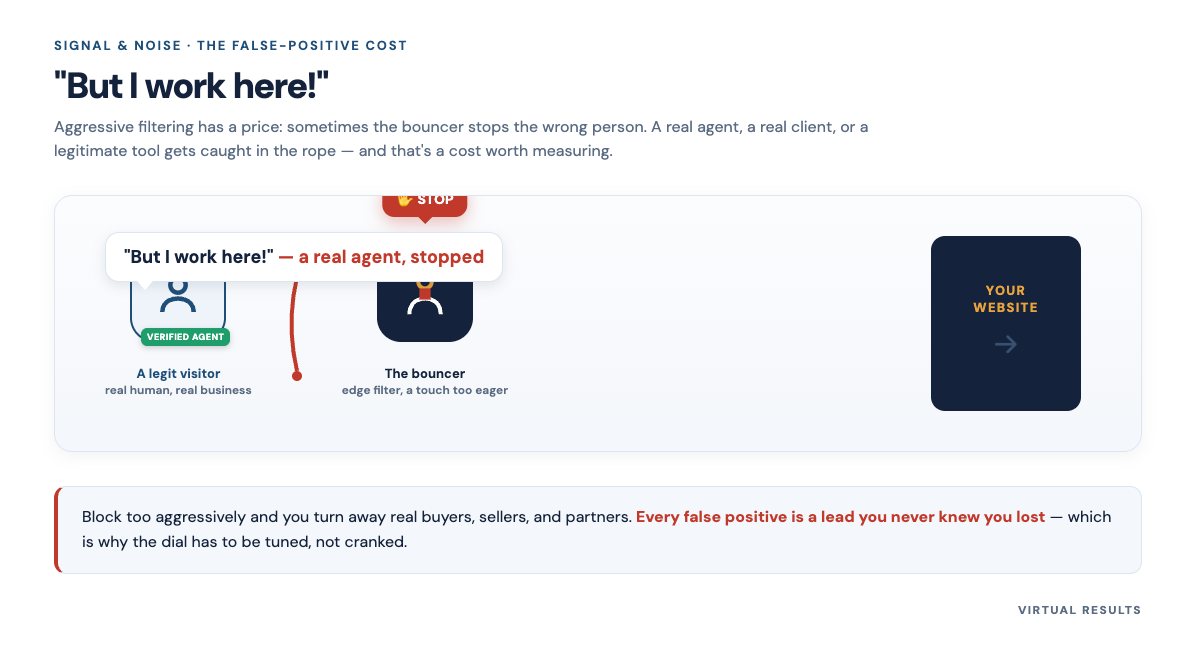
The whole office, one address. A team at a brokerage we host worked from the same office, all online through one shared connection — so to the outside world, the whole team looked like a single address sending requests fast. Several agents writing and saving blog drafts at once, from one IP, at office-WiFi speed, reads an awful lot like a script. The firewall got suspicious and started challenging them mid-write — exactly the kind of thing we tune for once we see it.
The agent who’d just hit publish. Another: an agent published a brand-new listing, then immediately loaded it over and over — adding the video tour, then the floor plans, refreshing to check each change, re-uploading, refreshing again. From the edge, that’s one visitor pounding a single new URL dozens of times in minutes. The bouncer flagged it. The “bot” was the listing agent doing exactly what a great agent does on launch day.
Why does this happen? The signals that catch a scraper — many requests, fast, from one source — are sometimes the same signals a busy human produces. There’s no setting that catches every bad actor and zero good ones. There’s only where you put the line.
We put it on the side of over-protecting — then tune, fast, when a real person gets caught. A managed challenge instead of a hard block means most false positives cost a few seconds, not a lockout; we add trusted office addresses to the guest list and loosen the rules around the workflows agents actually do. The goal isn’t a wall — it’s a door with a bouncer who learns.
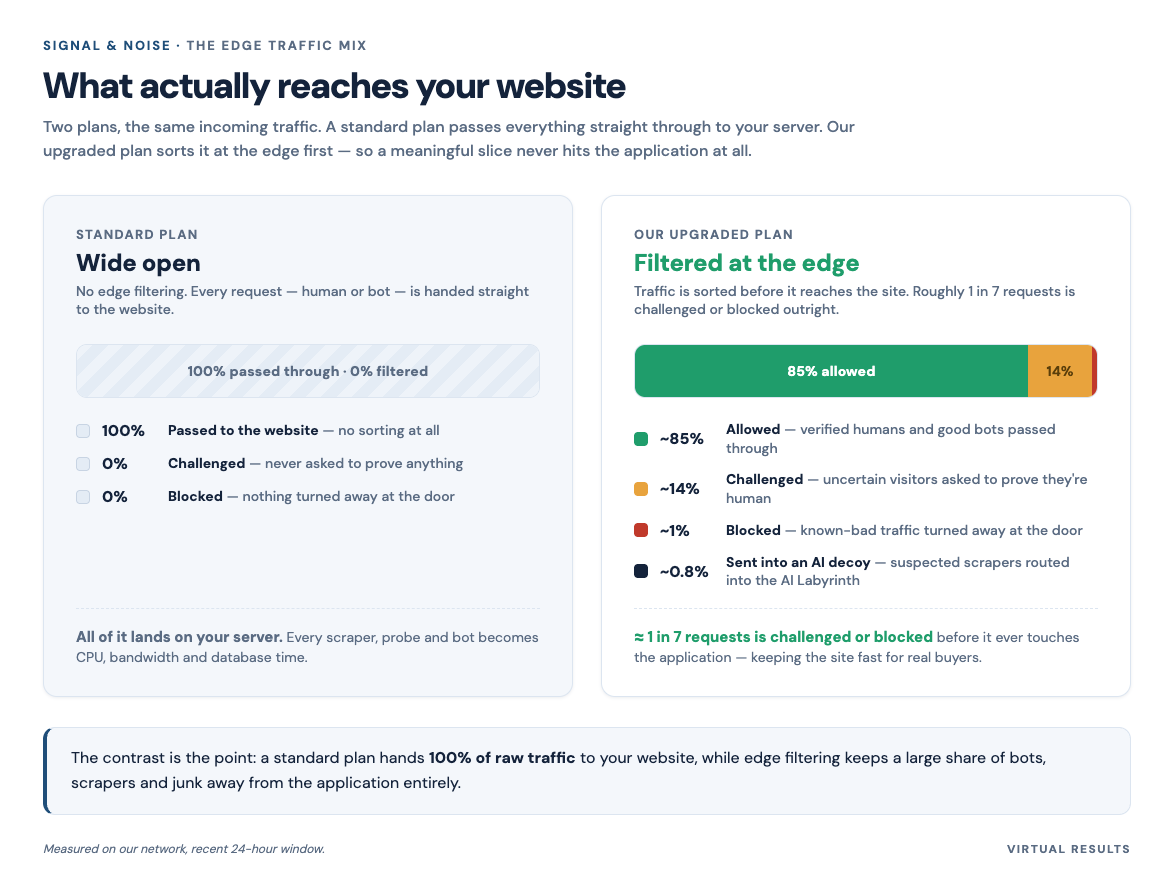
About 15% of everything hitting our edge gets blocked or challenged before it reaches a site at all — load your server never carries, bandwidth you never pay for, attacks that get no second chance.
The long version (for the curious)
If you’ve ever hardened a server the traditional way, the edge approach will feel familiar — just moved to a better vantage point. Before edge firewalls were cheap and everywhere, the classic toolbox lived on the server:
- fail2ban — watches your logs and temporarily bans an address after too many failed logins. Reactive, per-server, only as smart as the patterns you give it.
- mod_security — a server-side WAF that inspects requests using rule sets (often the same open community rules our edge runs), but only after the request arrives and is using your resources.
- Wordfence — the popular WordPress firewall and malware scanner that runs inside WordPress. By the time it decides, your PHP and database are already awake.
- IP reputation lists — shared block lists of known-bad addresses.
Every one is good, and we still believe in defense in depth — a site we host has protection at the server and the application layer, not only the edge. But notice the common thread: the classic tools all act after the request reaches your machine, so the bad guy is only turned away once he’s already cost you CPU. The edge firewall moves that same decision thousands of miles upstream, before the cost lands on you. Not a new idea; a better location for an old one.
A note on honesty with numbers: the exact share our edge blocks versus challenges, and the precise block rates per plan, are things we’d rather report from a real dashboard than guess at — are measured from our own dashboard over a recent 24-hour window: about 15% challenged or blocked on our upgraded plan, and effectively 0% on a standard plan that does no edge filtering. VR members get the upgraded protection at no additional cost. The rule counts (~26 vs. ~1,034, about 40×) and the block-vs-challenge behavior come straight from our own configuration. For the broader picture, independent measurement is mixed: Imperva’s 2025 Bad Bot Report found automated traffic surpassed human traffic for the first time in a decade — 51% of all web traffic in 2024 (bad bots 37%, good bots 14%), while Cloudflare’s network telemetry puts bots steadier at around 30%. They disagree because measuring “what’s a bot” is genuinely hard — the honest reason this series exists.
Next, in Part 6, we go inside the door — to the on-page defenses that catch what the bouncer misses, and the one category of bot we can’t just block.
Sources
- Imperva (Thales), 2025 Bad Bot Report — automated traffic = 51% of web traffic in 2024 (bad bots 37%, good bots 14%). imperva.com (vendor / industry report)
- Cloudflare Radar — Bots: cross-check showing bots ≈ 30% of traffic. radar.cloudflare.com/bots (vendor telemetry)
- OWASP Foundation — the OWASP Core Rule Set, the open community rule set our managed WAF stack includes. owasp.org (open-source project)
- OWASP ModSecurity Core Rule Set / mod_security background, for the server-side WAF contrast. coreruleset.org (open-source project)
- fail2ban project documentation, for the classic log-based banning tool. github.com/fail2ban (open-source project)
You just finished Part 5 of 7 of Signal & Noise.
Up next: Are You Human? reCAPTCHA, Akismet, and the Bots We Can’t Just Block — the on-page defenses behind the door, and the one kind of bot we can’t just block.
← We Built Your Website a Second Website — Just for the Robots | Are You Human? reCAPTCHA, Akismet, and the Bots We Can’t Just Block →
Jump back in
If you host with us, all of this is already running under your site — the bouncer, the upgraded rulebook, the tuning when a real person gets caught — at no extra cost, and we’re happy to walk you through exactly what’s protecting your listings. If you’re somewhere else and a firewall keeps stopping the wrong people (or doesn’t seem to be stopping anyone), we’d genuinely like to help. 👉 Come talk to us about your site.