Some of the slowest things on your website are the things you can’t see — plugins charging rent on pages they never even appear on.
TL;DR
- A lot of WordPress plugins quietly add work to every page load, even pages where they do nothing visible. We call it the invisible plugin tax.
- A common offender is a plugin that “phones the back door” (an admin-ajax request) just to grab a few lines of styling — spinning up the entire WordPress engine for a tiny errand, on every visit.
- The fix is boring and beautiful: print those styles directly into the page server-side, and only load a plugin’s CSS/JS on pages that actually use it.
- WP-Cron isn’t a real scheduler — it’s a to-do list that only gets checked when someone visits. One stuck “ghost” task from an abandoned plugin can stall the line behind it.
- Retiring a plugin doesn’t always remove its leftovers — old database tables can keep growing, and a deliberately retired URL is more honestly answered with a 410 Gone than a 404.
- None of this is obvious on one site. It tends to jump out only when you can watch many sites at once.
On this page
The back-door errand: a whole engine for a few lines of CSS
Imagine you own a car with a massive V8 engine. Every time you want a stick of gum from the glovebox, you start the engine, let it warm up, idle for a minute, grab the gum, and shut it off again. Nobody would do that. The cost is wildly out of proportion to the errand.
That is roughly what some WordPress plugins do, over and over, on every page.
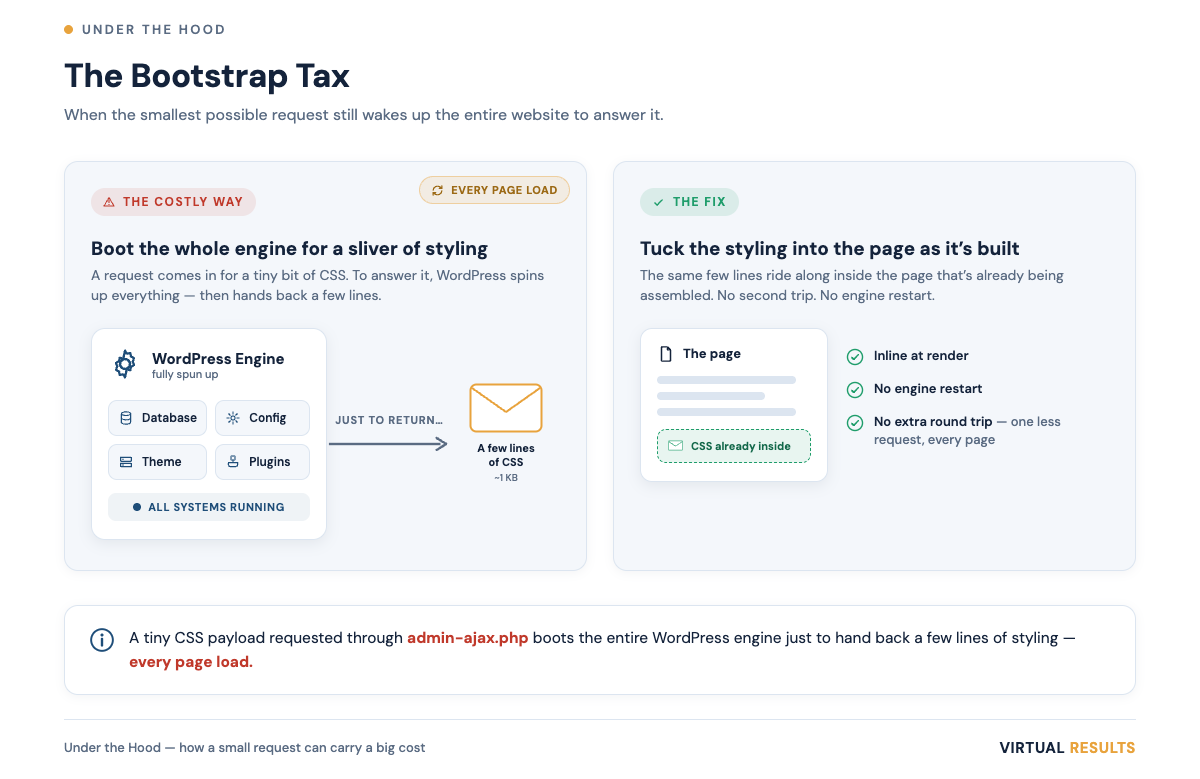
Here’s the mechanism. WordPress has a special back door called admin-ajax.php. It exists so plugins can ask the server small questions in the background — “is this username taken?”, “what’s the next page of results?” — without reloading the whole page. Handy. But there’s a catch most people never learn: a hit to that back door boots the WordPress system first. The database connection. The site configuration. The theme. And the plugins you have installed, whether or not they have anything to do with the question being asked. (WordPress’s own developer docs note that all AJAX requests are sent to admin-ajax.php.)
So picture a plugin that, on every page load, reaches through that back door just to fetch a few lines of CSS — its brand colors, say. To return that tiny payload, the server quietly starts the whole V8: bootstrap, plugin load, warm-up. Then it hands over the equivalent of a stick of gum.
One visitor, one page, one errand — you’d never notice. But websites don’t get one visitor. They get them all day, every day, and that little errand runs again and again and again.
The fix: hand it over at the door
The honest part: this isn’t the plugin author being lazy. The back-door approach is genuinely convenient, and it’s how a lot of tutorials teach it. It works. It’s just expensive in a way that stays invisible until you’re running it at scale.
The better pattern is almost embarrassingly simple. If the page already knows the brand colors, why send the browser back to fetch them? Just print them into the page while the server is already building it. WordPress even has a built-in, supported way to do exactly this — a hook that lets a plugin attach a small block of styling directly to the page it’s already rendering.
Done this way, the dynamic, per-site brand colors still work perfectly — each site can keep its own look. The difference is that the styling is already in the page when it arrives, instead of being fetched afterward. You delete an entire round-trip and an entire engine start-up. The visitor gets the same result, sooner, and the server gets to breathe.
The lesson generalizes: if a thing can be done once, while the page is being built, don’t make the browser ask for it again later. We dug into a related idea — separating the signal a page truly needs from the noise it doesn’t — in Signal and Noise. This post is the inverse view: not what a page sends out, but the hidden work it does to itself before anyone even sees it.
The hitchhiker: assets riding on pages that don’t use them
Here’s the second tax, and it’s a sneaky one.
Plugins ship their own styling and scripts (CSS and JavaScript). A “share to social” plugin has its little button styles. A “fancy testimonial slider” has its slider code. Reasonable. The problem is where those files get loaded. Many plugins load their assets on every page of the site — including pages that contain none of the plugin’s features.
So a buyer lands on one of your property detail pages — photos, price, description, map — and their browser is quietly also downloading the testimonial slider’s code, even though there isn’t a single testimonial on the page. It’s a hitchhiker. It adds weight, it adds requests, and it does absolutely nothing for that visitor.
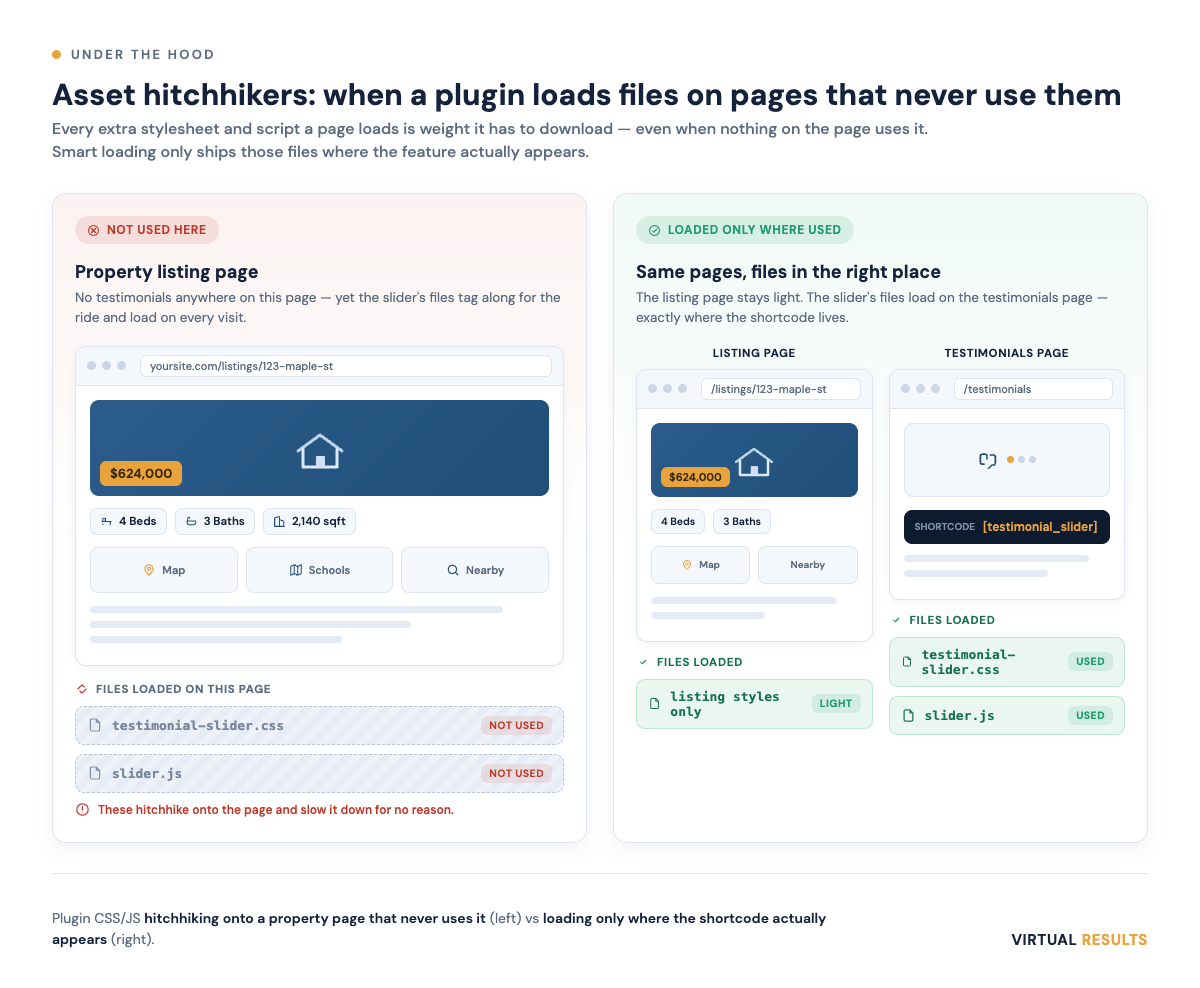
The right behavior is conditional loading: a plugin should look at the page and ask, “do I actually appear here?” Many WordPress plugins announce themselves through a shortcode — a little tag you drop into a page to place the feature. If that shortcode isn’t on the page, the plugin’s CSS and JavaScript shouldn’t load at all. Zero. The testimonial slider’s code belongs on the testimonials page and nowhere else.
This is the kind of tuning that doesn’t change how your site looks one pixel, but changes how it feels — especially on phones and slower connections, which is much of real estate traffic. (We’re careful here: a lighter page is good for visitors for its own sake. We’re not going to promise you it moves you up in Google — anyone who promises that is guessing. We talk about why in our how property search works walkthrough.)
WP-Cron is a queue, not a clock
Now for the timing problem, which is the one that bites at the worst moments.
Most people assume WordPress has a reliable internal clock — that “run this every hour” means a little robot wakes up every hour and does the job. It doesn’t. WordPress uses something called WP-Cron, and despite the name, it isn’t a real system scheduler. WordPress’s own documentation is refreshingly blunt about it: WP-Cron checks its list of scheduled tasks on page loads, not on a true system clock.
Read that again, because it’s the whole story: scheduled tasks tend to run when someone visits the site. No visitors, no checking the list. It’s not a clock — it’s a to-do list that gets looked at when the door opens. (Tasks do eventually run at the next opportunity; the catch is when that opportunity arrives.)
Most of the time that’s fine. But here’s the failure mode. WP-Cron works through its to-do list, and tasks can get in each other’s way. Now suppose a plugin you installed years ago — and forgot about, or that the author abandoned — still has a task on that list: “phone home to the vendor’s server.” Except the vendor’s server is gone. So the task dials a number that no longer answers, and it waits. And waits.
While it waits, work behind it can wait too. The cache that was supposed to clear after you edited a listing. The email notification for the lead who just filled out your contact form. The listing feed that was supposed to refresh. Stuck behind one ghost task calling a dead phone.
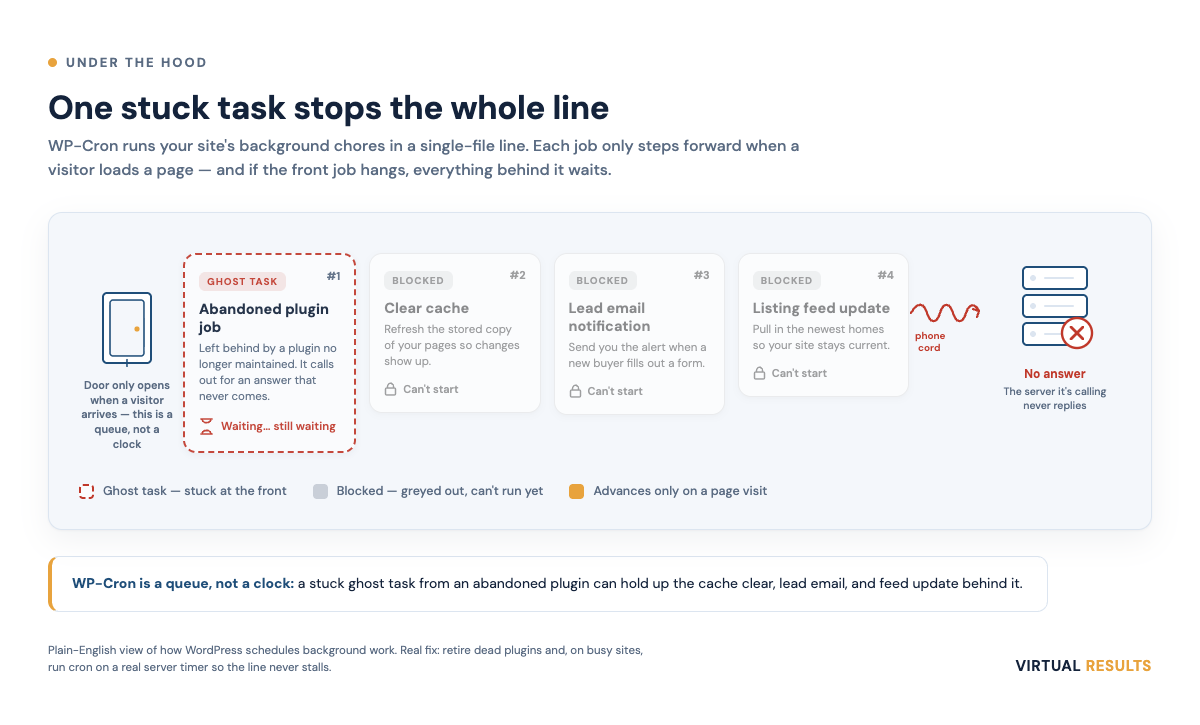
This is why “I have a few old plugins I don’t really use” isn’t always harmless. A dead plugin isn’t just dead weight — its leftover scheduled tasks can quietly become a liability that delays the exact things you most need to happen on time, like that lead email. If the words “lead email got stuck” make your stomach drop, good — that’s the right instinct. It’s the same family of concern as keeping an eye on whether your site is actually up and responding, which we covered in website monitoring and uptime.
The leftovers: data that outlives the plugin
Deleting a plugin feels final, like throwing out an appliance. But plugins often leave things behind in the basement.
Many plugins create their own tables in your site’s database — their own filing cabinets. An audit-log plugin, for example, might quietly record a row every time something happens on your site. Useful while you’re using it. But here’s the catch: when you remove the plugin, those tables frequently stay, and if anything is still writing to them, they keep filling up — with records nobody will ever read. A filing cabinet that keeps getting fatter in a room you’ve already moved out of.
None of this is visible from the front of the house. Your site looks identical. But the database gets heavier over time, paying interest on a plugin you stopped using ages ago. Good housekeeping means cleaning up the data when you retire the tool — not just deactivating the tool and walking away.
And when you retire a URL: say “gone,” not “missing”
Sometimes retiring a feature means an old web address goes away for good — a plugin’s special page, an endpoint, a tool you’ve sunset. You have a choice in how you tell the rest of the internet it’s gone.
A 404 (“Not Found”) says: “I don’t have that right now.” It’s ambiguous — maybe it’s a typo, maybe it’s temporary, maybe it’ll come back.
A 410 (“Gone”) says something stronger and more honest: “That existed, and it’s permanently gone.” For Google’s indexing, the two end up in a similar place — Google’s documentation notes that a previously indexed URL is removed from the index for both 404 and 410. So this isn’t a ranking trick; the value of 410 is honesty. When you’ve deliberately removed something for good, 410 is the accurate thing to say — to search engines and to any other tool reading your site.
This is the flip side of a topic close to our heart — what happens when a listing page disappears and a buyer lands on nothing. We went deep on that in 404 pages and real estate listings. A 404 is for “this listing sold and the page is gone but the site’s fine”; a 410 is for “this whole tool is retired, please forget it exists.” Different messages for different situations.
Why this pattern hides in plain sight
Here’s the part we find genuinely interesting, and a little humbling.
Every one of these taxes is nearly invisible on one website. One extra back-door errand? Imperceptible. One hitchhiking script? A few extra kilobytes. One ghost cron task? It might never even fire on a quiet site. If you only ever looked at a single site, you’d shrug and move on. Most people do, for years.
The pattern becomes obvious when you can watch many sites at once and notice the same small thing happening across all of them — the same back-door errand, the same hitchhiker, the same ghost task. Suddenly a rounding error becomes a shape. The cost was invisible at the individual level and obvious at the platform level.
That’s not us being clever; it’s just the vantage point from which these things show up. It’s the same reason a single doctor might miss a trend that a public-health system catches immediately — not more intelligence, just more samples. A lot of “under the hood” work is exactly this: spotting the small, repeated, invisible cost and quietly removing it, so individual sites get lighter without their owners ever having to think about admin-ajax.php or WP-Cron. (It’s the same instinct behind keeping the bad traffic out, which we wrote about in bot management for real estate websites.)
The takeaway for you isn’t to go audit your plugins tonight with a flashlight. It’s just this: the cost of a plugin isn’t only what it does — it’s what it does on every page where it does nothing. That’s the invisible tax. The good news is that it’s very fixable, mostly by people who get to see the whole platform at once.
If you’d rather just have all of this handled quietly in the background, that’s what we do — say hello.