You type three words into a search box and a fraction of a second later you have a wall of homes, sorted, mapped, and ready to scroll. Here’s the not-so-secret machinery that makes that feel instant — and why it takes more than one database to pull off.
TL;DR
- A good property search isn’t one database doing everything — it’s a few specialists, each doing the one job it’s best at.
- Results feel instant because of an inverted index: the search engine looks things up in a pre-built map instead of reading every listing one by one.
- The pipeline is a two-step move: find the matching IDs first, then “hydrate” them into full listings with photos, price history, and agent info.
- “Within 3 miles of downtown” is a geometry problem, not a text-matching problem — it needs a real geospatial index.
- The classic glitch is sync drift: when one store updates a beat before another, you can briefly see a stale agent name or photo.
This is part of our Under the Hood series, where the Virtual Results Platform Team explains how the plumbing of a modern real estate website actually works — no sales pitch, just the honest mechanics. If you’ve ever wondered why search feels sluggish on one site and instant on another, or why a listing occasionally shows the wrong agent for a minute, this one’s for you.
On this page
The problem hiding behind the search box
From the outside, a property search looks like one thing: a box, a button, a result. Underneath, it’s juggling three completely different kinds of data, and they don’t naturally get along.
Think about what a real estate platform has to keep straight at the same time:
- Tidy, predictable records — agents, offices, accounts, billing, site settings. These have the same fields every time. An agent always has a name, an email, an office. Boring, in the best way.
- Messy, shape-shifting records — the listings themselves. A downtown condo has HOA dues and board-approval fields. A rural single-family has acreage and a septic system. A retail building has a cap rate and a lease type. No two property types describe themselves the same way.
- Find-it-fast queries — “3-bed, 2-bath, under $600k, within 3 miles of downtown, with a garage.” That’s not a record you store; it’s a question you ask, over and over, fast.
Trying to force all three into a single database is like asking one employee to be your accountant, your warehouse manager, and your race-car driver. They can technically attempt all three. They’ll be excellent at none of them. The grown-up answer in software has an academic-sounding name — polyglot persistence — which just means: use the right tool for each job.
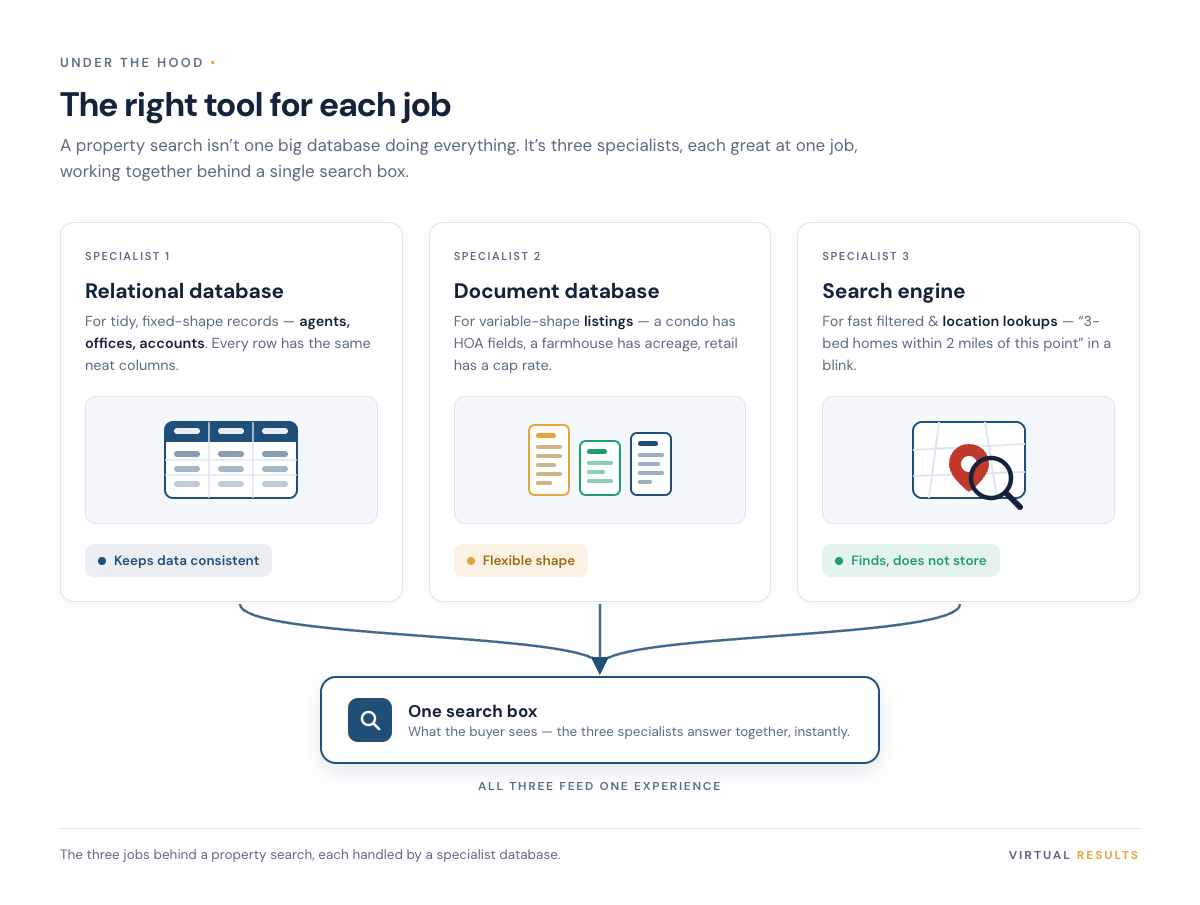
Three specialists, three jobs
1. The relational database — for things that don’t change shape
Agents, offices, accounts, permissions, settings. This is the world of the relational database (MySQL or MariaDB, in plain terms). It’s built around tidy tables with fixed columns, and it’s very good at one thing the others aren’t: keeping data consistent. When an agent changes their email, it changes in exactly one place and every part of the system agrees. That reliability is the whole point.
The catch: relational databases are happiest when every row looks like every other row. The moment your data starts sprouting odd, optional fields, they get awkward.
2. The document database — for records that refuse to sit still
That’s exactly the problem with listings, which is where a document database (commonly MongoDB) earns its keep. Instead of forcing every property into the same rigid columns, it stores each listing as a flexible document — roughly, a self-describing bundle of fields. The condo gets its HOA and board-approval fields. The farmhouse gets acreage and septic. The retail space gets its cap rate. Nobody has to leave a pile of columns blank to accommodate the one property type that needs them.
The honest tradeoff: that flexibility means the database won’t enforce a tidy shape for you — that discipline has to come from the application. We think it’s a fair trade for listing data, because listing data is genuinely irregular. Pretending otherwise just moves the mess somewhere worse.
3. The search engine — for answering questions fast
Neither of the first two is built to answer “everything matching these eight filters, sorted by relevance, right now.” That’s the job of a dedicated search engine (Elasticsearch is a common choice). It’s not really there to store the listings — it’s there to find them, fast. How it does that is the most interesting trick in the whole stack, so it gets its own section.
Why search feels instant: the inverted index
Here’s the question that matters: when you ask for “3-bed homes under $600k with a pool,” how does the system avoid reading through every single listing to check each one?
It doesn’t read them at all. It consults an inverted index.
The analogy is the index at the back of a textbook. If you want every mention of “mortgage,” you don’t read all 600 pages looking for the word — you flip to the index, find “mortgage,” and it hands you the exact page numbers. An inverted index does the same thing for listings. As Elastic’s documentation puts it, it’s “a data structure that maps each token to the documents that contain it.”
So “has a pool” already points to a ready-made list of pool listings. “3 bedrooms” points to another. The engine grabs those lists and finds the overlap. Compare that to the alternative — a database doing a full scan, checking every record one at a time, like reading the whole textbook to find one word. One approach gets slower as your listing count grows. The other barely notices.
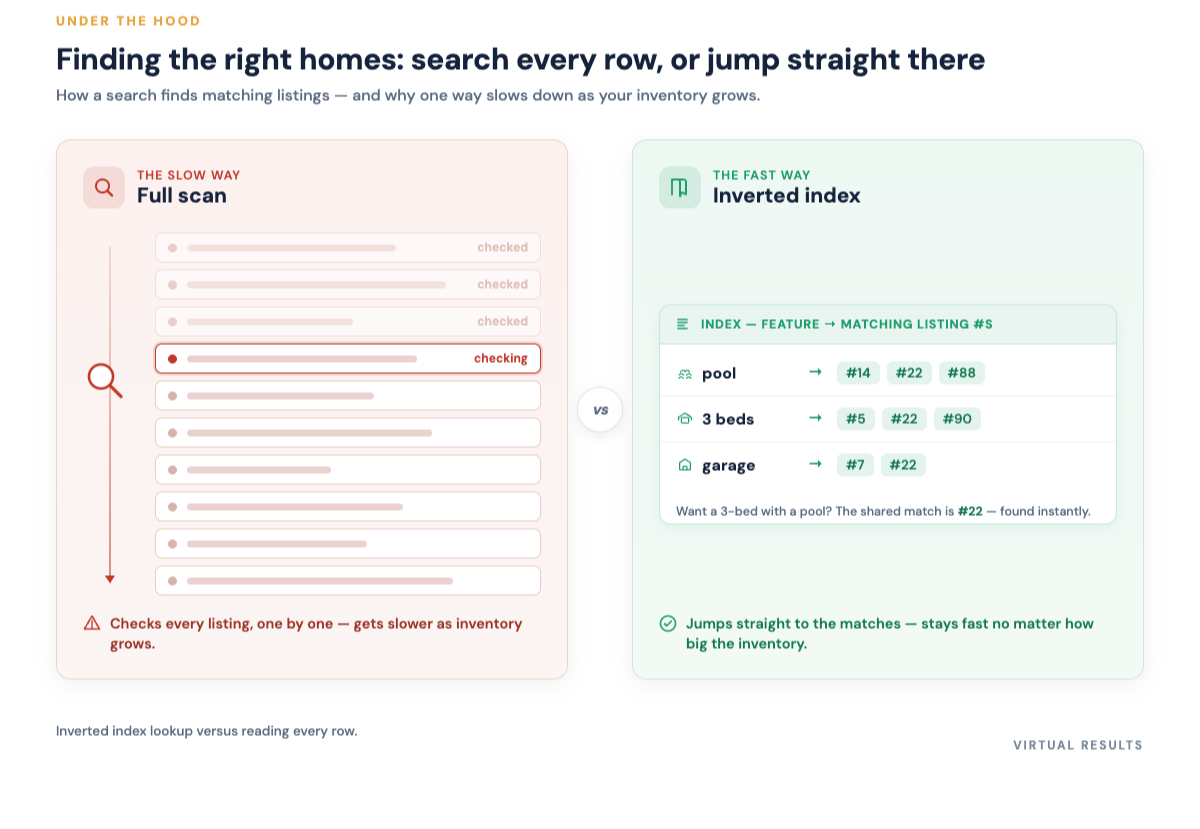
That’s the real reason a well-built search returns in a fraction of a second while a poorly architected one makes you wait: it’s the difference between looking something up and reading everything. (If you enjoy this kind of “the structure is the speed” idea, our companion piece on signal and noise — about the automated traffic hammering real estate sites — wanders down a related path.)
The two-step pipeline: find the IDs, then hydrate
There’s a subtlety worth knowing, because it explains a glitch you’ve probably seen. The search engine doesn’t hand back full listings. It hands back a ranked list of IDs — essentially, “here are the matching listings, in this order.” Lightweight and quick.
Only then does a second step kick in: hydration. The system takes those IDs and fetches the full details — the photo galleries, the price history, the school info, the agent’s contact card — from wherever each piece lives. “Hydrate” is just the industry’s word for taking a bare ID and filling it back up into a complete, displayable listing.
So the keystroke-to-result journey looks like this:
- Parse the intent — turn “3-bed under 600k near downtown” into structured filters and a location.
- Ask the search engine — the inverted index returns the matching listing IDs, already ranked.
- Hydrate — resolve those IDs into full listing records with photos, history, and agent details.
- Render — paint the results onto the page and the map.
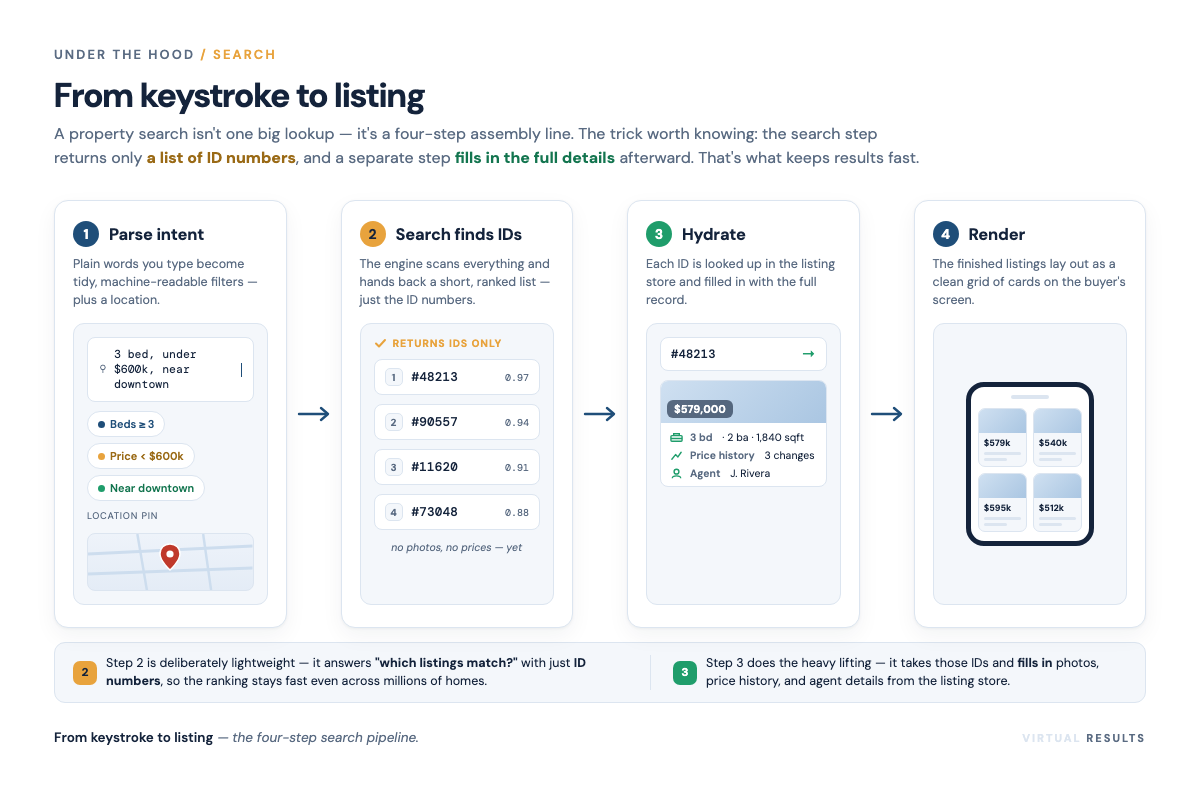
Splitting “find” from “fetch” is what keeps things fast. The expensive, detailed work only happens for the handful of listings actually about to appear on screen — not for the thousands that didn’t match.
“Near downtown” is geometry, not text
Now the filter that quietly breaks naive search: location.
“Within 3 miles of downtown” feels like just another filter, but it’s a fundamentally different kind of question. You can’t answer it by matching text. A listing being in the same ZIP code doesn’t make it close, and a place a mile away across a county line isn’t far. Distance lives in coordinate space — latitude and longitude — and answering it means doing actual geometry on a curved planet.
A traditional text-style filter (the database equivalent of “find rows where the city contains these letters”) simply can’t compute “is this point inside a 3-mile circle.” For that you need a geospatial index — a structure built specifically to answer “what’s near here” and “what’s inside this shape” quickly. MongoDB’s documentation, for instance, describes operators like $geoWithin that select locations falling within a given area, backed by dedicated geo indexes. It’s a different math problem, so it gets a different tool.
This is why map search is a genuine architectural decision, not a checkbox. Drawing a polygon on a map and getting “homes inside this neighborhood I just traced” only works if the data underneath was designed for geometry from the start.
When the seams show: sync drift
Splitting your data across specialists buys speed and flexibility. It also creates the most common cosmetic bug in the business, and we’d rather explain it than pretend it never happens.
Picture this: an agent’s identity — name, headshot, brokerage — lives in the tidy relational database. But for speed, the link between a listing and its agent gets copied — cached — into the search and listing layer, so results don’t have to make an extra trip for every card. Most of the time, wonderful.
But when that agent updates their photo or moves brokerages, there’s a brief window where the source of truth has changed and the cached copy hasn’t caught up. For a moment, a listing might show the old headshot or the previous brokerage. That’s sync drift: two stores that briefly disagree until a reconciliation step brings them back in line.
It’s almost always temporary and harmless, but it’s worth understanding, because the fix isn’t “use fewer databases” — it’s designing sensible rules for which store wins and how quickly the copies refresh. Caching is a tradeoff: you accept a sliver of staleness in exchange for speed. Knowing that tradeoff exists is half of managing it. (Listings also genuinely disappear when they sell, which is its own quiet drama — we get into that in our note on what happens when a listing goes away.)
Where the listings come from in the first place
One more piece, because it shapes everything upstream: the data doesn’t originate with the website. It arrives from the MLS through standardized feeds.
- RETS — the older Real Estate Transaction Standard. Still around, increasingly legacy.
- RESO Web API — the modern standard. Per the RESO documentation, it’s a RESTful, OData-based way to transport real estate data using open web standards, and it’s where the industry is steadily heading.
And the term you’ll hear constantly: IDX, or Internet Data Exchange. That’s the arrangement that lets a brokerage display the latest listings across its MLS region on its own site — not just its own inventory. When you land on an agent’s website and can browse essentially every home in the area, IDX is why. Those incoming feeds are exactly the irregular, shape-shifting records that made us reach for a document database back in section two — the whole architecture is downstream of how this data actually arrives.
The big picture
So the next time a search returns in the blink of an eye, here’s what actually happened: your words became structured filters, a search engine consulted a pre-built index to find matching IDs without reading every listing, a geospatial index handled the “near downtown” part with real geometry, those IDs got hydrated into full listings from the store that holds each kind of data best, and it all painted to your screen — ideally before sync drift had a chance to show a stale headshot.
A few databases, each doing the one thing it’s best at, coordinated well enough that it feels like one. That coordination — not any single piece of software — is the actual craft. It’s also exactly the kind of thing that’s invisible when it’s done right and maddening when it isn’t.
If you’d rather not think about any of this and just have search that’s fast, accurate, and shows the right agent every time, that’s the part we handle — say hello.
More from the Under the Hood series is on the way. If a specific piece of the machinery has always bugged you, that’s a good candidate for a future post.