Virtual Results Real Estate Publishing / Real Estate Visual Library
Behind the deed: two interests, one property
A document-by-document map for explaining what title professionals examine, whose interests a policy protects and what buyers should ask next.
California edition · Source review: October 8, 2026 · Original editorial diagram
Why this visualization works
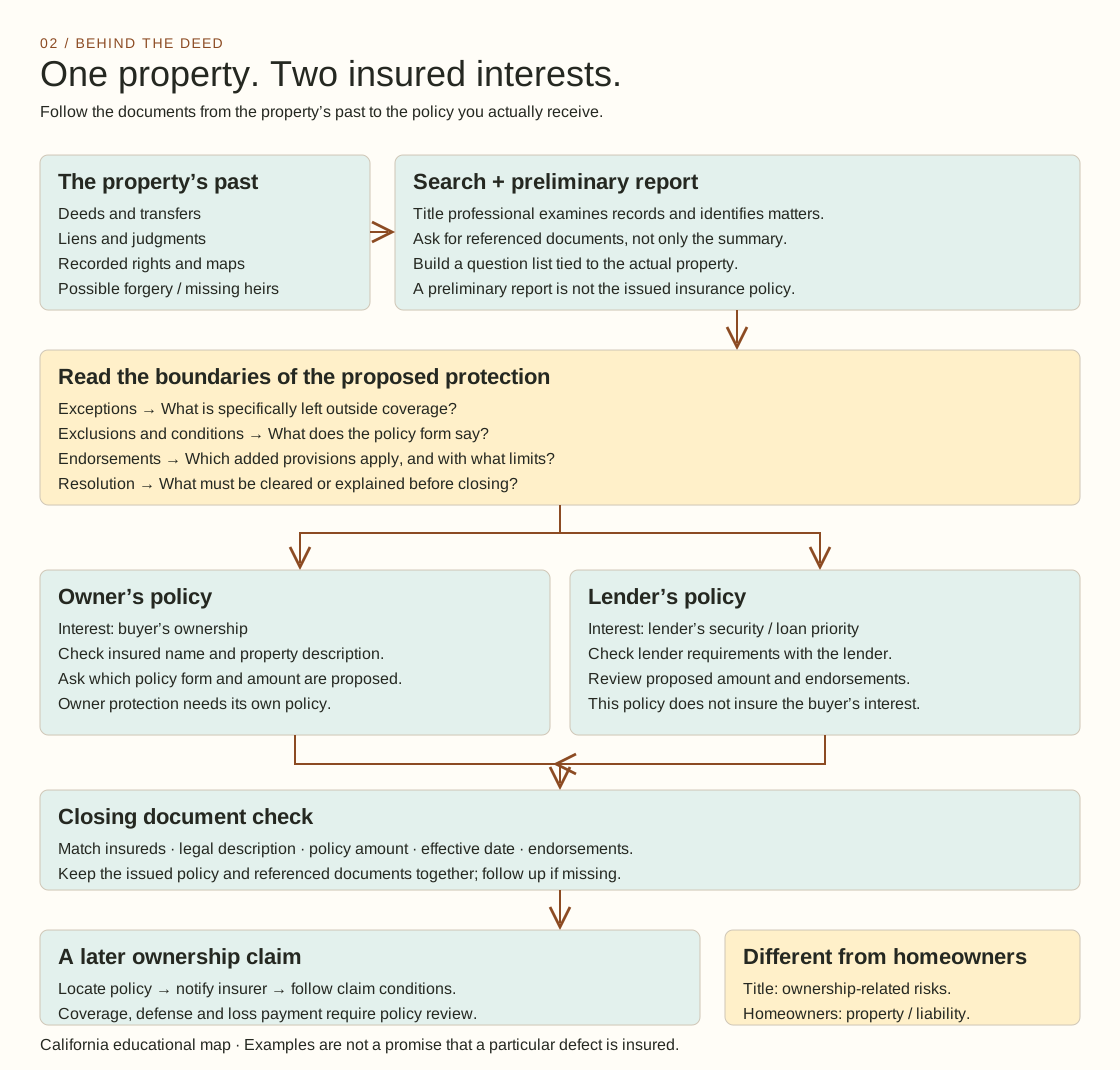
Document-flow diagram with a two-interest comparison. The flow follows the property’s history into a search, report, policy questions and closing documents. The split into owner and lender panels gives each insured interest its own place. This is useful because one property can lead to two different protection conversations.
What it leaves out: This view organizes documents and questions; it does not rank title risks or show how likely a claim is. The two panels are a comparison, not a claim that the policies have identical scope.
Open it together: Use the report as your starting point, follow the supporting documents and ask which interest each proposed policy protects. Then return to the closing-document check together.
This original visual draws on the official consumer resources below. Explore their guidance for the fuller explanation.
California Department of Insurance — Title Insurance guide · Consumer Financial Protection Bureau (CFPB) — owner’s title insurance explained
Start with the ownership story
California’s guide describes title searches, preliminary reports, policy exclusions and optional endorsements. Examples of potential defects include liens, record errors and forgery. Coverage depends on the issued policy. The diagram turns these ideas into a document review sequence; it does not say every example is insured.
A good first question for a buyer is simple: “What would you like to understand about the rights that come with this property?” Write their answer beside the map. A buyer may be thinking about a driveway, a fence or a planned addition. Rather than guessing which document settles the question, assign a person to find the relevant document and a qualified professional to explain it. Keep the question visible until the answer arrives.
Give the owner and the lender separate lanes
The CFPB explains that owner’s title insurance can protect a homeowner against a claim arising from before the purchase. A lender’s policy protects the lender rather than the owner. The California guide likewise distinguishes those interests. That is why the map splits into two lanes instead of placing one shield over the whole house.
In a buyer consultation, ask the client to trace each lane with a finger. Who is named? Which interest is being discussed? Where will the document be stored? The exercise takes less than a minute but provides a durable way to ask better questions. Avoid using policy price as shorthand for coverage quality. Ask the title professional to explain the actual proposed forms, amounts, endorsements and exceptions side by side.
Turn a report into a question ledger
The central orange panel is the most useful part of this visual. Treat each referenced matter as an entry in a question ledger. Give it a plain-language question, the document reference, the person responsible for an answer and a status. Our suggested statuses are “not yet reviewed,” “question sent,” “answer received” and “next action agreed.” These describe work performed rather than declaring legal rights.
Here is an illustrative meeting prompt: “The report mentions an easement. Which document should we read, who will explain its meaning, and what do we still need to ask about our intended use?” The prompt deliberately avoids deciding that an easement is harmless or harmful. The value comes from connecting a specific buyer concern to a specific review task. Use a separate row for each matter so one reassuring conversation does not hide another unanswered question.
Close the loop after closing
The California guide recommends checking the policy amount, effective date, property and interests described. Our added workflow is to keep the issued policy with the related documents, label the folder clearly and schedule a check that it was actually received. If a later ownership claim appears, locate the policy and seek insurer instructions; the map’s final box is a review path, not an automatic-payment promise.
For brokerage training, let one colleague play the buyer and another play the coordinator. Hand them an invented report with two unresolved questions and ask them to identify what they would send to the title professional. For a public carousel, use one slide for the property’s past, one for the two insured interests and one for the document checklist. Link each excerpt back to the complete map. Keep the explanatory labels attached when sharing so the arrows retain their meaning.
Homeowners insurance addresses a different category of property and liability risks. Use the contrast box to start a discussion, then send the client to the appropriate insurance professional for the relevant contract.
Adapt this for your clients
Download the editable SVG and open it in a vector editor, presentation app or design tool that supports SVG. Replace the title and accent color with your brand, add a small logo and preserve the explanatory labels. For another state, replace the California source and have a locally qualified professional review the factual statements. For a property-specific meeting, turn the question labels into your own worksheet; keep client names and private documents out of public versions.
Use the full map in a buyer guide, print it for a consultation or make a narrated walkthrough. Simplify one panel for social media while linking to the complete resource. This original diagram and editorial text may be reused and adapted with attribution to Virtual Results Real Estate Publishing; note your changes and avoid suggesting official endorsement. Linked source materials retain their own terms.
Cite or share this resource
Link directly to this page when citing it. Copy the suggested citation below, and add “adapted from” if you change the diagram.
Sources — official guidance and credits
California educational edition. Sources reviewed 8 October 2026. California Department of Insurance: Title Insurance (No revision date displayed on the guide); CFPB: What is owner’s title insurance?. Factual guide points are summarized above; meeting exercises, question ledgers and diagram structure are original editorial suggestions. No government agency endorses this resource. Policy wording and qualified advice govern individual situations.
✦ Open it together. Make the conversation better.
Try this with a client: open the diagram during your next conversation. Start with “Where are we now?” Then ask “Which question would you like us to work through?” Let the visual guide the discussion, and keep the client’s own priorities at the center.
Pro tip: bookmark this page so you can return to it in a consultation, showing or team meeting. Give us some love: if you share or adapt it, please link back to Virtual Results Real Estate Publishing.
Make it yours with ChatGPT or Claude — including PowerPoint
Copy the prompt below and paste it into your assistant with this page’s diagram.
Create an original real estate visual based on the idea on this page. First walk me through my choices: client audience, local context, colors, shapes, level of detail, and the questions I want to explain live. Preserve the important distinctions in the explanation. Then remake the visual from scratch in my chosen style, with a clear title, readable labels and the credit “Virtual Results Real Estate Publishing” linked to this page. Give me an editable diagram and a simple browser demo with pause and restart controls if motion adds value. Also create a PowerPoint version if your tools allow it; otherwise give me exact slide-by-slide instructions, including layout, speaker notes and a source slide. Use one overview slide, then one close-up slide for each decision or stage. Suggest two questions to ask clients while we review it together.