Virtual Results Real Estate Publishing / Real Estate Visual Library
Before the keys: the home insurance evidence map
Turn “we have an insurance quote” into a better conversation about the home, the policy and the documents still needed.
California edition · Source review: October 8, 2026 · Original editorial diagram
Why this visualization works
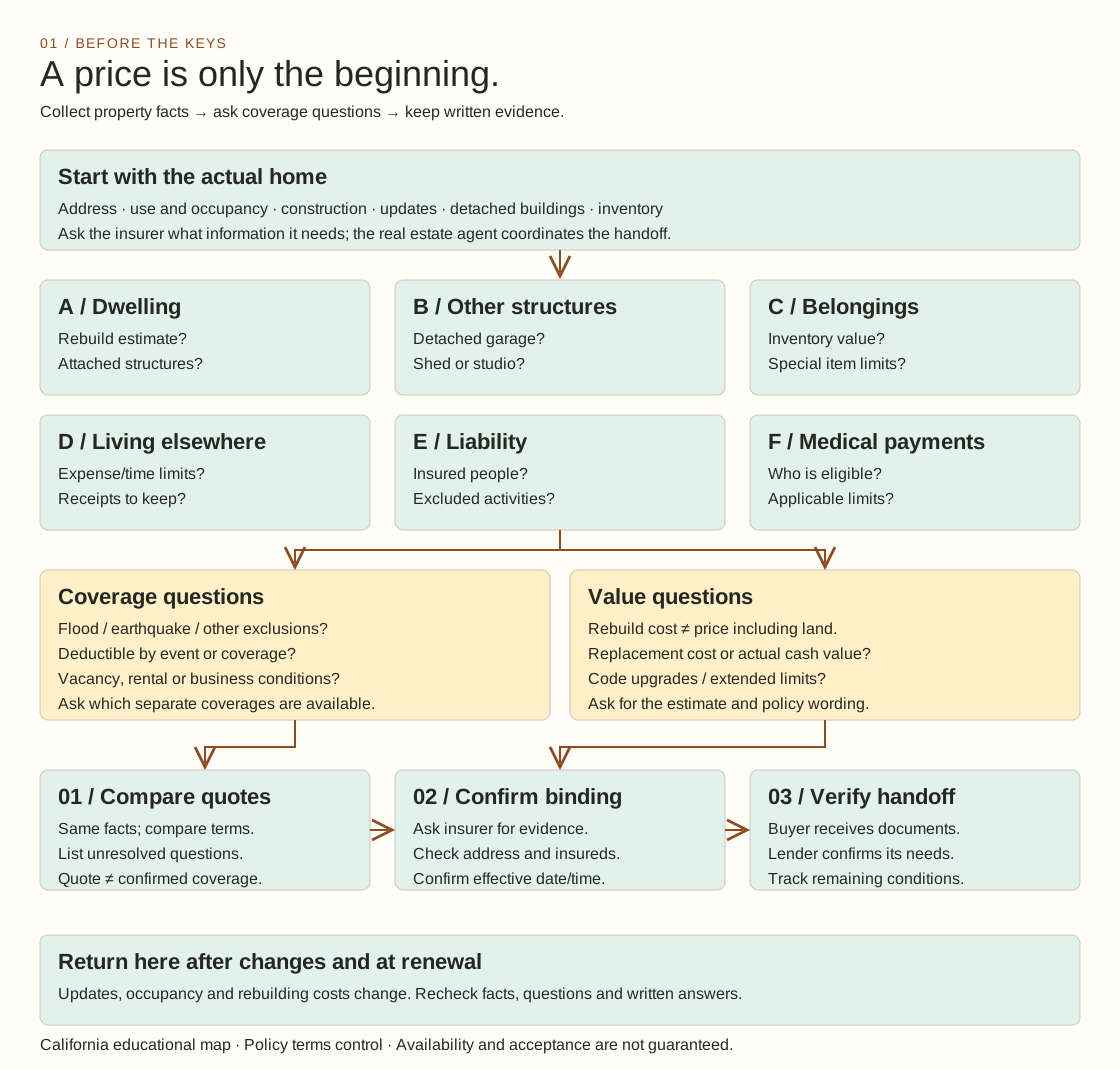
Coverage-question matrix with a three-stage handoff flow. The top grid gives the home, other structures, belongings, living expenses, liability and medical payments separate places in the discussion. The lower flow then distinguishes comparing a quote, confirming binding and checking the document handoff. It combines “what are we asking about?” with “where are we in the process?”
What it leaves out: Box size does not represent a coverage amount or the importance of a risk. The diagram does not compare premiums or summarize a particular policy’s full wording.
Open it together: Open it while reviewing a quote with a client. Find the unanswered coverage question first, then locate the handoff that needs attention.
This original visual draws on the official consumer resources below. Explore their guidance for the fuller explanation.
California Department of Insurance — Residential Insurance guide · Consumer Financial Protection Bureau (CFPB) — homeowners insurance explained
Read the home before reading the price
The six coverage categories in the California guide separate the dwelling, other structures, belongings, loss of use, liability and medical payments to others. The guide distinguishes rebuilding cost from the sale price, which includes land. It also identifies common exclusions and the importance of policy-specific limits and endorsements. These categories provide the factual foundation of the diagram; the proposed evidence workflow is our editorial design.
Begin a buyer meeting by sketching the property in the center of a blank page. Around it, write down what needs a conversation: the detached garage, a recently remodeled kitchen, a collection of musical instruments, a future rental plan. Use questions rather than coverage labels when the facts are incomplete. That makes the drawing useful even before a quote arrives. Ask the insurance professional to translate each question into a document, answer or next action.
The three handoffs that deserve their own boxes
Our workflow deliberately gives quoting, binding confirmation and final verification separate spaces. Ask the insurance professional what evidence confirms coverage and what conditions remain. Put the buyer’s questions beside the documents rather than inside a hurried closing email. The real estate agent can organize this discussion without deciding what an insurance contract covers.
For a working session, prepare a small comparison sheet with a row for each unresolved question. Use columns labeled “question,” “answer received,” “document or page,” “who confirms” and “next action.” Leave a blank where the answer is missing. Avoid a green check mark that merely means somebody sent a file. A better check mark records what was checked, by whom and when. If a date changes, revisit the date rather than assuming the previous answer carries forward.
A useful conversation about monthly costs
The CFPB explains that lenders usually require homeowners insurance and that many borrowers pay the premium through a mortgage escrow account. Estimated property insurance appears in the Loan Estimate’s projected payments. This creates a practical teaching opportunity: ask the buyer to place the premium discussion beside the loan payment discussion, then have the lender explain the treatment for that specific loan.
Try this workshop prompt: “Imagine the insurance number changed after your first estimate. Which other conversation would you revisit?” Let buyers name the affordability discussion, the lender conversation or their cash planning. The diagram becomes a shared reference that helps participants spot a missing handoff. It should never substitute for an actual quote, insurer acceptance or the lender’s own confirmation.
Use the visual in a client meeting
Show the entire map first, then cover everything except the two orange question panels. Invite the buyer to choose the question that feels least clear. Build the meeting around that choice. In a listing presentation, use the map to explain how you coordinate information requests. In a brokerage training session, ask two colleagues to practice the buyer and coordinator roles, while a third listens for statements that should instead become questions for the insurance professional.
For social content, crop one question panel and pair it with a short invitation: “Which insurance question would you ask before receiving the keys?” Link back to this complete map so readers can see its context. Keep captions descriptive; a dramatic promise about guaranteed protection would undermine the value of the exercise.
Adapt this for your clients
Download the editable SVG and open it in a vector editor, presentation app or design tool that supports SVG. Replace the title and accent color with your brand, add a small logo and preserve the explanatory labels. For another state, replace the California source and have a locally qualified professional review the factual statements. For a property-specific meeting, turn the question labels into your own worksheet; keep client names and private documents out of public versions.
Use the full map in a buyer guide, print it for a consultation or make a narrated walkthrough. Simplify one panel for social media while linking to the complete resource. This original diagram and editorial text may be reused and adapted with attribution to Virtual Results Real Estate Publishing; note your changes and avoid suggesting official endorsement. Linked source materials retain their own terms.
Cite or share this resource
Link directly to this page when citing it. Copy the suggested citation below, and add “adapted from” if you change the diagram.
Sources — official guidance and credits
California educational edition. Sources reviewed 8 October 2026. California Department of Insurance: Residential Insurance (Revised January 2026); CFPB: What is homeowner’s insurance?. Factual guide points are summarized above; meeting exercises, question ledgers and diagram structure are original editorial suggestions. No government agency endorses this resource. Policy wording and qualified advice govern individual situations.
✦ Open it together. Make the conversation better.
Try this with a client: open the diagram during your next conversation. Start with “Where are we now?” Then ask “Which question would you like us to work through?” Let the visual guide the discussion, and keep the client’s own priorities at the center.
Pro tip: bookmark this page so you can return to it in a consultation, showing or team meeting. Give us some love: if you share or adapt it, please link back to Virtual Results Real Estate Publishing.
Make it yours with ChatGPT or Claude — including PowerPoint
Copy the prompt below and paste it into your assistant with this page’s diagram.
Create an original real estate visual based on the idea on this page. First walk me through my choices: client audience, local context, colors, shapes, level of detail, and the questions I want to explain live. Preserve the important distinctions in the explanation. Then remake the visual from scratch in my chosen style, with a clear title, readable labels and the credit “Virtual Results Real Estate Publishing” linked to this page. Give me an editable diagram and a simple browser demo with pause and restart controls if motion adds value. Also create a PowerPoint version if your tools allow it; otherwise give me exact slide-by-slide instructions, including layout, speaker notes and a source slide. Use one overview slide, then one close-up slide for each decision or stage. Suggest two questions to ask clients while we review it together.