Under the Hood: why the software that runs a listing site looks nothing like the software that runs a coffee shop’s homepage — and why the difference is mostly invisible until the day it isn’t.
TL;DR
- A real estate site is not a brochure site. It’s a huge, constantly-changing pile of listing pages, a near-infinite number of search-filter combinations, and traffic that lurches around with the market. That shape breaks the assumptions cheap hosting is built on.
- The hosting tier you’re on decides who you share a building with. Shared hosting means many sites on one machine — a “noisy neighbor” can drag yours down or expose it. A VPS gives you an isolated slice. Dedicated or managed gives you the most isolation, plus someone running it for you.
- Isolation contains the blast radius. Giving each brokerage its own database and its own pool of workers means one site’s runaway problem can’t take down the others.
- “Uptime” is just arithmetic. 99% sounds great until you do the math: that’s roughly three and a half days a year offline. We’ll show you how to convert any guarantee into real downtime in your head.
- Speed at scale comes from layered caching — and the hard part is invalidation, not building the cache. A listing site can’t be cached like a static blog, because listings change.
On this page
- The job is harder than it looks
- Who’s in the building with you: the three hosting tiers
- The quiet superpower: per-client isolation
- What “uptime” actually means
- Speed at scale: the cache stack as a shock absorber
- The genuinely hard part: knowing what to forget
- Bonus: deploying without going dark
- So what does this mean for you?
The job is harder than it looks
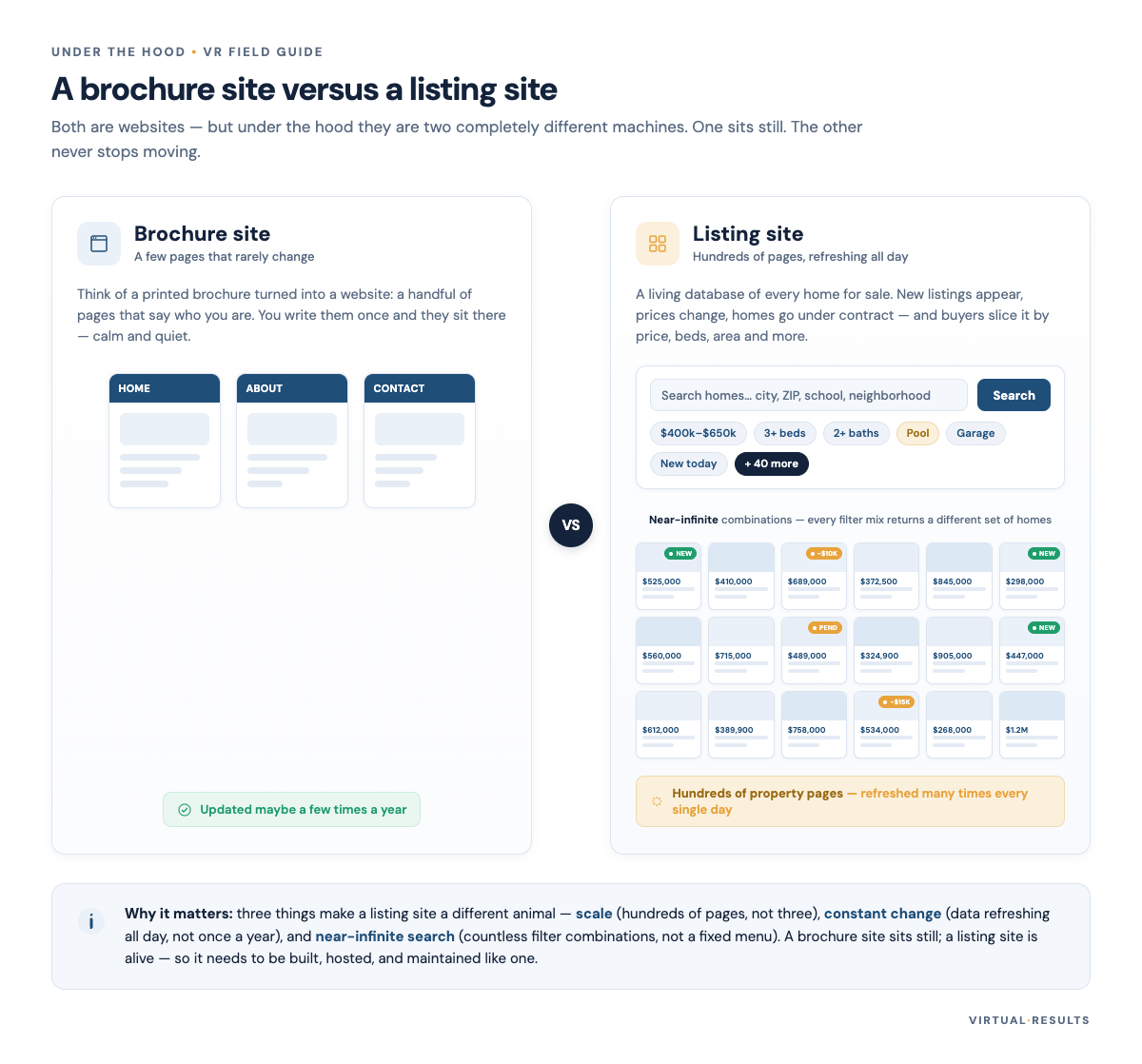
Most websites are brochures. A restaurant, a law firm, a local plumber — a handful of pages that barely change month to month. You could host one of those on a potato and nobody would notice.
A real estate site is a different animal, and it’s worth being specific about why, because the “why” is what every hosting decision downstream has to answer to.
- It’s enormous and it never sits still. A listing site can carry many thousands of property pages, and those pages refresh constantly — new listings arrive, prices change, homes go under contract. The data underneath is being rewritten throughout the day.
- The search space is effectively infinite. “3 bed, 2 bath, under $600k, with a pool, in these four ZIP codes, sorted by newest” is one combination out of a number so large you’d never enumerate it. Every filter a buyer touches is potentially a brand-new page the server has to assemble on the spot.
- Traffic swings hard. A featured listing, an email blast, a market headline, a Sunday-evening browsing rush — demand spikes and then falls off a cliff. The site has to survive the peak without paying for the peak around the clock.
Hold those three traits in your head. Big and always-changing. Infinitely combinable. Spiky. Ordinary hosting was designed for a world where none of those are true.
Who’s in the building with you: the three hosting tiers
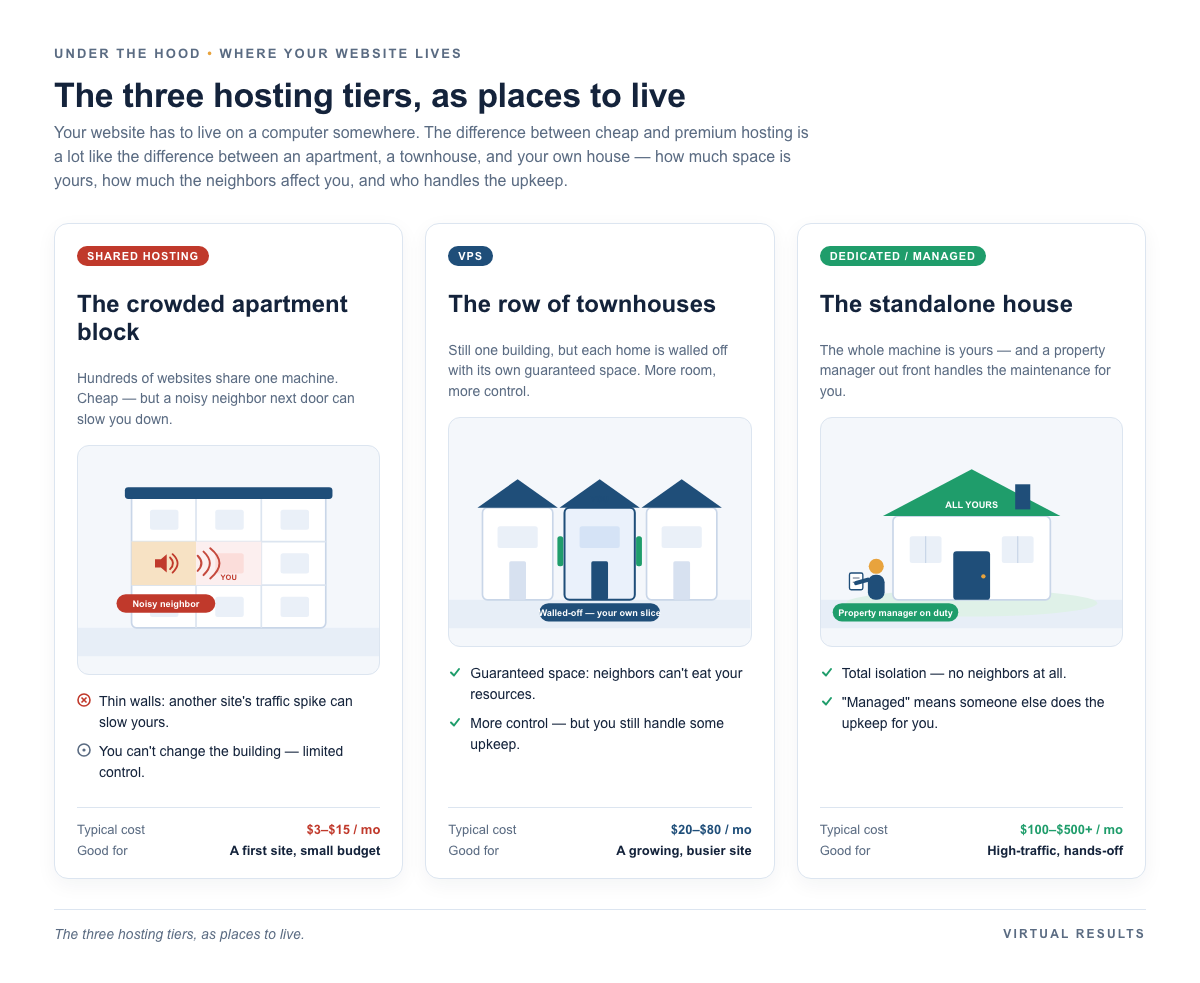
When people say “hosting,” they’re usually talking about one of three arrangements, and the honest difference between them is mostly about isolation — how much of a machine is truly yours.
Shared hosting: the apartment with thin walls
Shared hosting is the cheap tier, and it’s cheap for a clear reason: many websites live on a single machine, splitting its memory and processing power. For a brochure site, that’s a perfectly reasonable trade.
The risk is the one every apartment-dweller knows: the neighbors. In hosting it’s called the noisy neighbor problem. Some other site on your machine gets a traffic spike, runs a sloppy script, or — worse — gets compromised, and your site slows to a crawl or gets caught in the fallout. You did nothing wrong. You just shared a wall with someone who did.
VPS: your own slice
A VPS (virtual private server) carves the machine into isolated slices, each with resources reserved for it. You’re still on shared hardware, but the walls are real walls now — a neighbor’s bad day is far less likely to become yours. You also get more control over how the slice is configured. The trade is that someone has to do that configuring.
Dedicated and managed: the whole house, with a property manager
At the top, a dedicated setup gives you a machine (or a tightly-isolated environment) that’s yours alone — the most isolation you can buy. “Managed” adds the part that actually matters for a busy professional: someone else handles the operations — the updates, the backups, the monitoring, the 2 a.m. problems. It costs more. Whether that’s worth it depends entirely on what your site does for your business, which is a fair question to ask out loud rather than defaulting to the cheapest tier.
We’re not going to pretend dedicated or managed hosting is the right answer for everyone — a one-page agent bio site doesn’t need it. But a real estate listing platform leans on isolation hard, for a reason we’ll get to next.
The quiet superpower: per-client isolation
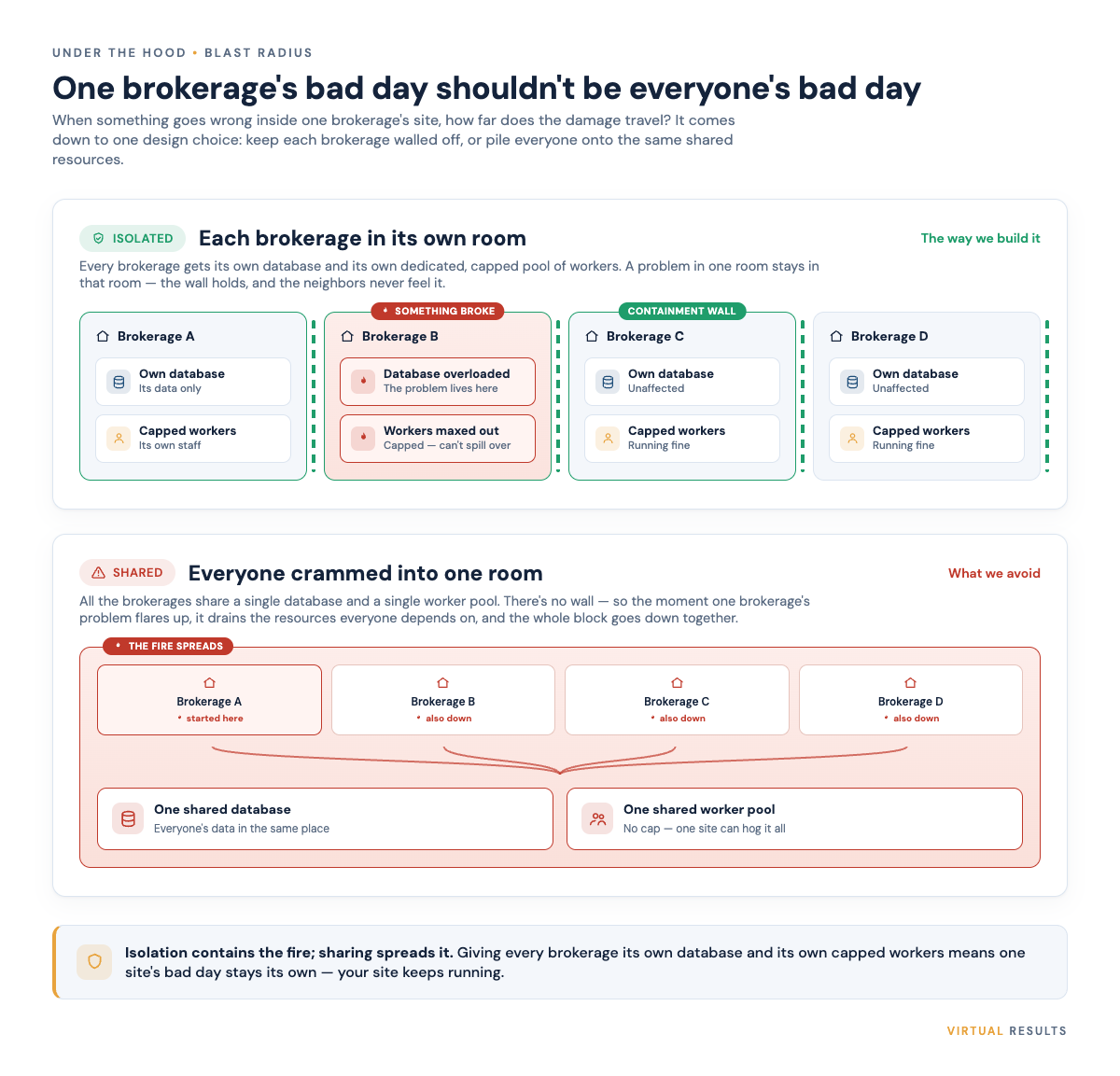
Here’s a design choice that does more for reliability than almost anything flashy: give each brokerage its own database, and its own dedicated pool of worker processes with sensible limits on how much it can consume.
Why this matters comes down to a phrase worth stealing from engineers — blast radius. When something goes wrong (and over a long enough timeline, something always goes wrong), how far does the damage spread?
- A runaway query — some report that accidentally asks the database for everything at once — only chews up that one brokerage’s resources. The brokerage next door doesn’t even notice.
- Data corruption or a bad import is contained to a single database. It can’t quietly bleed into anyone else’s listings.
- A burst of activity — one office fires off a big email campaign and everyone clicks through at once — hits that office’s own worker pool, which is capped, rather than starving every other site on the machine.
Contrast that with the common alternative: one big shared database where everyone’s data lives in the same tables, and everyone competes for the same pool of workers. It’s simpler to build. But it means every client is exposed to every other client’s worst day. One stuck process, and the whole neighborhood feels it.
Isolation isn’t free — it’s more moving parts to manage — and we’d rather be honest about that than sell it as magic. But for a platform whose whole job is hosting many brokerages at once, containing the blast radius is one of those unglamorous decisions that pays for itself the first time it quietly prevents a disaster you never hear about.
What “uptime” actually means (do the math)
Hosting plans love to advertise an uptime percentage. The number always looks reassuringly close to 100, which is exactly the problem — the gaps between those numbers are much bigger than they feel. It’s pure arithmetic, and once you can do it in your head you’ll never read a guarantee the same way:
- 99% uptime = roughly 3.65 days of downtime per year.
- 99.9% (“three nines”) = roughly 8.8 hours per year.
- 99.99% (“four nines”) = roughly 53 minutes per year.
That’s a year’s allowance, so it could land all at once — and “the website was down for most of a day” is a different kind of bad than “the website blipped for under an hour.” Each extra nine is roughly a tenfold cut in downtime. The way to read any guarantee is to translate the percentage into hours and ask yourself: if all of that happened during a single busy Saturday open-house push, would I be okay?
No citation needed here — it’s just multiplication. A year has 8,760 hours; 1% of that is about 87.6 hours, which is your 3.65 days. Take it from there.
Speed at scale: the cache stack as a shock absorber
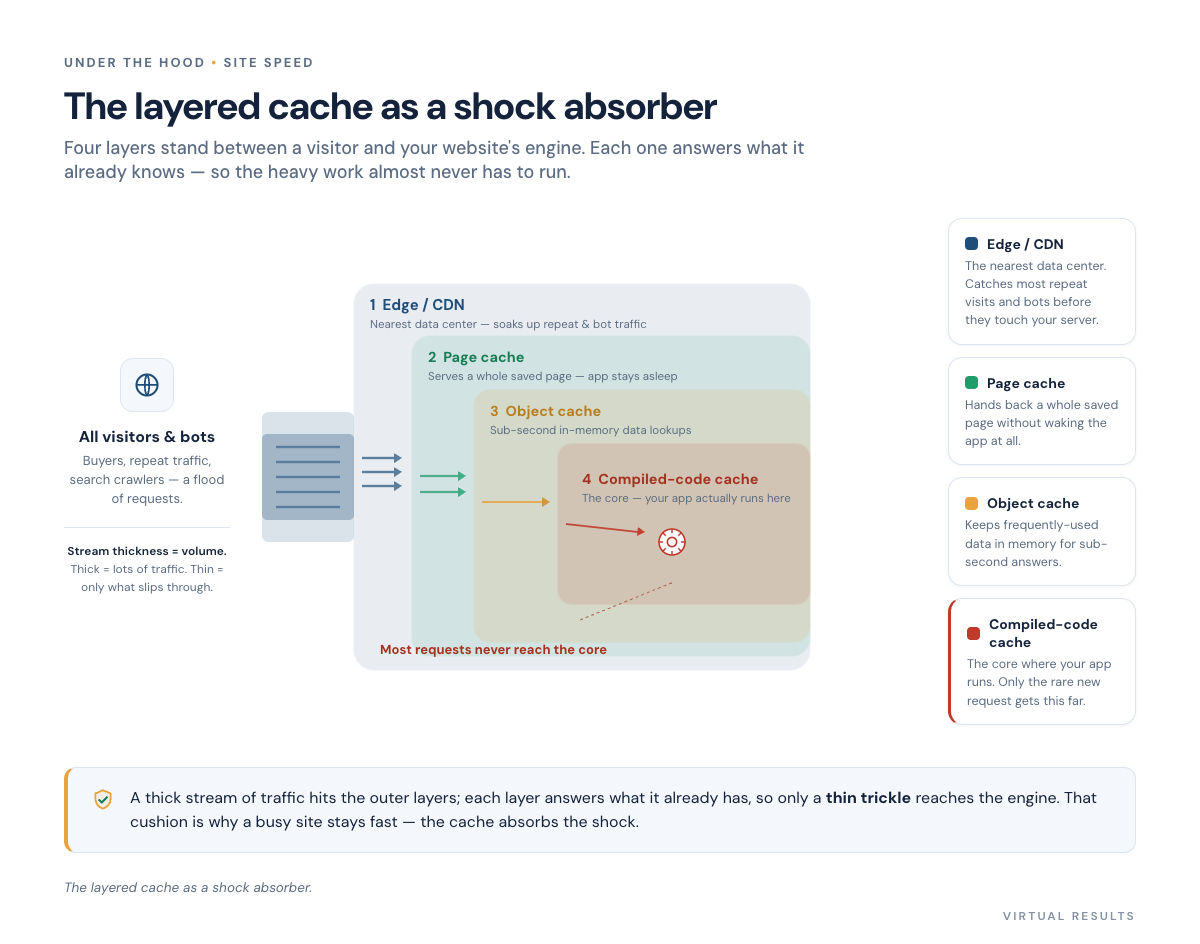
So how does a site with thousands of pages and unpredictable spikes stay fast? Not by having one heroic, gigantic server. It stays fast by answering as many requests as possible before they ever reach the expensive part of the system.
Think of it as a series of layers, each one shielding the next. A request gets answered at the first layer that already has the answer, and most requests never make it past the early layers. From outside in:
- The edge or CDN. The outermost layer lives in data centers all over the world, physically close to your visitors. It absorbs repeat visits and the relentless background hum of automated traffic, answering from the nearest location instead of bothering your server at all. (Cloudflare has a plain-English explainer on what a CDN does, linked below.)
- The page cache. When a request does reach your server, this layer can hand back a complete, pre-built HTML page without ever starting up the application or touching the database. It’s the difference between handing someone a photocopy and writing the document fresh each time.
- The object cache. For the work that does need real data, this layer keeps frequently-used pieces in fast memory, where they’re available almost instantly instead of being looked up from disk over and over.
- The compiled-code cache. At the core, this keeps the application’s code in its ready-to-run compiled form, so the server skips re-translating the same instructions on every single request.
Stacked up, these layers act like a shock absorber. When a spike hits — the email blast, the viral listing — the outer layers soak up the impact, and only a thin trickle of genuinely new work reaches the expensive core. The site stays smooth while the same load would have flattened a single unprotected server.
That outer layer is doing double duty, too: a real estate site gets hammered by automated crawlers, and the edge soaks up much of that before it ever costs you anything. We go deep on telling real visitors from the rest in Signal & Noise — so we’ll leave that thread there rather than repeat it.
The genuinely hard part: knowing what to forget
Here’s the twist, and it’s the part that separates a real estate site from a static blog. Building the cache is the easy half. The hard half is cache invalidation — expiring the right pages at the right moment.
A blog can cache a post and forget about it; the post doesn’t change. A listing site can’t. When a home goes under contract, drops in price, or sells, the cached versions of every page that showed it — the listing page, the neighborhood search results it appeared in, the “newest listings” widget on the homepage — are now wrong. And nothing erodes trust faster than a buyer falling in love with a home your site swears is still available.
So the cache has to be surgical. When a listing changes, the system needs to expire exactly the pages affected — without dumping the entire cache, because blowing it all away means every visitor suddenly hits the slow path at once, and you’ve recreated the very stampede the cache existed to prevent. Too little invalidation and you serve stale, embarrassing data. Too much and you lose the protection. Getting that balance right, continuously, as data changes throughout the day, is most of the actual engineering. The cache is the easy idea; knowing precisely what to forget, and when, is the craft.
Bonus: deploying without going dark
One more piece of the “this isn’t ordinary hosting” picture. When it’s time to push an update to a busy site, you don’t want visitors hitting a half-installed version mid-deploy. The clean way is an atomic deploy, often done with a symlink.
The shape of it, in plain terms: the new version of the site is uploaded into its own separate folder and health-checked there, fully assembled, while the live site keeps serving the current version undisturbed. Only once the new release passes its checks does a single pointer — a “current” symlink — flip to it. To visitors, the switch is seamless; there’s no window where the site is broken or down. And if something looks wrong, you flip the pointer back just as fast. It’s the website equivalent of building the new stage behind a curtain and then opening the curtain, rather than rebuilding the stage while the audience watches.
So what does this mean for you?
You don’t need to run any of this yourself — but it helps to know what’s actually holding your site up, and what questions to ask. The short version:
- A listing site has demands a brochure site never will. Size, infinite search, and spiky traffic are the whole story.
- Isolation is reliability. Your own database and your own worker pool mean someone else’s bad day stays someone else’s bad day.
- Translate uptime into hours before you trust a number. 99% is days, not minutes.
- Fast at scale = layered caching done carefully — and the real skill is invalidation, not the cache itself.
If you want to go further down the rabbit hole, our other Under-the-Hood pieces dig into related corners: how we tell real visitors from signal and noise, why a flood of bot-only traffic deserves its own treatment, what a web application firewall and bot management actually do, why 404 pages on a listing site are their own special problem, and the broader security hardening checklist we work from.
If you’d rather not think about any of it and just have it handled properly, that’s what we do — say hello.