
The short version
- What it is: one page, 7,500 to 11,000 words, that answers everything a buyer asks about one city. Neighborhoods, schools, commute, home styles, taxes, fire zones, insurance and local rules.
- What’s around it: 16 parts, from live listings to a city podcast, all pointing back to the guide and to you.
- How original it is: we ran our two demo guides through Copyscape, the plagiarism checker editors have used for two decades. Monrovia came back 98% original and Pasadena 99%. The only matches were official names, like “Fire Hazard Severity Zone.”
- How long it takes: about two weeks from your interview to a finished preview.
- What it costs: about $2,100 in tools and time to do it yourself. We do it for $1,199 (founding rate $899).
Why one big page beats fifty small ones
Most agent websites have the same pages. A home page, an about page, a search page, and a few blog posts that say a city is “charming” and “close to everything.” None of them answer the questions buyers actually type at eleven at night. Is this house in a fire zone? What will my property tax really be? Can I build a backyard cottage? Which part of town is in which school district? How long is the drive to downtown at rush hour?
Buyers ask those questions in two places now. They type them into Google, and more and more they ask an AI assistant like ChatGPT or Claude. Both kinds of search are looking for the same thing: a page that answers the question directly, backs it up with a source, is written by someone who knows the subject, and is kept current. Google spells this out in its guidance on helpful, people-first content. The AI assistants behave the same way in practice. They quote pages that are specific, sourced and clearly authored, and they skip pages that are vague.
A single long guide does that better than a scattering of short posts, for three reasons.
It’s where the questions are. A buyer researching a move asks dozens of related questions. One page that answers all of them, in order, with a table of contents, is the page they bookmark and send to their partner. It’s also the page Google can see answers the whole topic, not just one corner of it.
It earns trust in one place. Every fact links to an official source. Every section shows its date. The author box names you, your license number and your brokerage. That’s a lot of trust signals, and they add up when they’re on one page instead of spread thin.
It’s a hub. The guide is the center of a small web. Twenty-four blog posts go deeper on one section each and link back. Every social post links to a blog post or the guide. Your Google Business Profile points to it. Local organizations link to it. Each of those links tells search engines the guide is the page that matters.
We’ve been building agent websites at Virtual Results for a long time, and we’ve had the best results with exactly this: big, careful, long-form pages. So we turned it into a product.
Why not just use an instant AI guide?
Tools now promise a neighborhood page from a ZIP code in thirty seconds. It’s a fair question: why spend two weeks on something a machine can do in half a minute?
Because thirty seconds is how long it takes to look like everyone else. Here’s the difference, line by line.
| Instant AI page | City Buyer Guide | |
|---|---|---|
| Facts | Whatever the model remembers, often out of date | Researched from official sources, each one linked where it appears |
| Checking | None | An independent second review, plus your own fact check |
| Originality | Often close to thousands of other AI pages | Checked by Copyscape: 98–99% original in our demos |
| Fair housing | Often written for buyer “types” | Places described, never people, checked against a written rule set |
| Your voice | Generic | Your own answers from a Zoom interview, approved by you |
| Images and video | Stock photos or none | Original paintings, a narrated video tour, a reel and a podcast |
| Listings and stats | Static or missing | Live listings and market stats, filtered to the real city boundary |
| After launch | Nothing | 24 posts, a year of social and quarterly updates |
| Proof | None | A Provenance Record of every fact, edit and review |
The deeper problem with instant pages is that they’re all built from the same place: the model’s memory of what’s already online. So they all say roughly the same thing, often in roughly the same words. Search engines see thousands of near-identical pages about the same cities, and there’s nothing to choose between them. AI assistants have even less reason to quote a page that only repeats what they already know.
A City Buyer Guide adds things that aren’t anywhere else: facts checked this year against primary sources, your first-hand experience, original images and media, and live local data. That’s what makes a page worth ranking and worth quoting.
The fair-housing point deserves a second look, too. An instant tool that writes “this neighborhood is perfect for young families” has put words on your website that could create real trouble under your license. Every word of a City Buyer Guide is reviewed against a written fair-housing rule set before you ever see it.
Who it’s for
City Buyer Guides work best for agents who:
- Want to own a city online. If you’d like to be the name people find when they research your city, a guide is the most direct way to get there. We build one per city, per agent, so the city is yours.
- Get relocation buyers. Buyers moving from out of the area research for months before they call anyone. The guide, the podcast and the video meet them during those months.
- Have a specialty. Probate, historic homes, investors, first-time buyers, hillside homes. The guide’s interview and posts lean into what you’re known for.
- Are building a new website. A new site with a strong guide on day one starts with real content, not three empty pages.
- Are tired of posting. The year of social media is planned and scheduled. You can add to it, but you don’t have to feed it.
They’re less of a fit if you work a wide area with no home city, or if you’d rather not put your name and license behind detailed, specific information. The guide is valuable precisely because it’s specific, and specific is a commitment.
What you get: the 16 parts
Here’s every piece, in one table. The rest of this article walks through each one.
| # | Part | What it is | Why it matters |
|---|---|---|---|
| 1 | The guide | 7,500–11,000 words on one city, with a quick answer, table of contents and FAQ | The page buyers bookmark, and the page Google and AI assistants quote |
| 2 | Research and fact-checking | 100+ official sources, an independent second review, and your fact check | Accuracy you can stand behind under your license |
| 3 | Live listings | Your listings feed, filtered to the city’s real boundary, placed in each neighborhood section | Turns readers into showings |
| 4 | Live market stats | Prices, days on market and inventory that update themselves, dated and sourced | Keeps the page current without rewriting it |
| 5 | Your voice | A 30-minute Zoom interview that becomes quotes, video clips and audio clips | First-hand experience no AI tool can copy |
| 6 | Search labels (schema) | Structured data that tells Google who wrote the page, what it covers and that you’re licensed | Clear authorship, FAQ answers and local signals |
| 7 | Answers for AI assistants | Direct question-and-answer blocks written to be quoted (ChatGPT, Claude) | Gets you named when a buyer asks an AI about your city |
| 8 | Maps and local search | Map embeds, consistent name, address and phone, and Google Business Profile links | Ties the page to your local presence |
| 9 | 98% original | A Copyscape check before launch, with the result on file | No copied text, ever |
| 10 | Original images | Original paintings of the city and its home styles, plus maps and charts | No stock photos, and images worth sharing |
| 11 | Video | A narrated video tour and short clips, uploaded to your YouTube and embedded | A second search engine and a reason to stay on the page |
| 12 | The city podcast | A two-host audio conversation about the city, on YouTube and as a download | Buyers listen in the car, and it’s shareable |
| 13 | Listen audio | The full guide read aloud, plus short audio snippets for each section | Accessibility, and more time on page |
| 14 | 24 blog posts | Each one goes deeper on one section and links back to the guide | More ways in, all pointing to the hub |
| 15 | A year of social | Share cards, clips, stats cards and Google Business Profile posts, scheduled for 12 months | The guide keeps showing up all year |
| 16 | Local links | Links out to local establishments, and a real plan to earn local links back | Local credibility, the hardest signal to fake |
That’s a lot. It’s easier to think about it as four groups:
- The page (parts 1–4): the guide itself, its research, and the live listings and stats inside it.
- The trust (parts 5–9): your voice, the labels search engines read, the answers AI assistants quote, your local presence, and proof that it’s original.
- The media (parts 10–13): paintings, video, the podcast and audio.
- The reach (parts 14–16): blog posts, a year of social, and local links.
Part 1: The guide itself
The guide is a single page on your website. Our Pasadena guide runs about 11,000 words. Our Monrovia guide runs about 7,300, because Monrovia is a smaller city with fewer neighborhoods to cover. The length isn’t a target. It’s what it takes to answer the questions properly.
Every guide follows the same backbone, adjusted to the city:
- A quick answer. Three or four sentences at the very top that sum up the city for a buyer in a hurry. This is also the block most likely to be quoted by an AI assistant, so it’s written to stand on its own.
- A table of contents. Buyers jump straight to the part they care about, and Google can show those jump links in search results.
- Neighborhoods. Every main buying area, with approximate boundaries, the kinds of homes you’ll find, what to check, and how it compares to the areas around it. We describe places, never people. More on that under fair housing below.
- Schools. Which districts serve which parts of the city, how to confirm a specific address, and how enrollment works. We never rank schools or describe who attends them. We point buyers to the official lookup tools.
- Commute. Freeways, transit lines and stations, typical drive times to major job centers, and the honest truth about rush hour.
- Home styles. The architecture you’ll see, from Craftsman bungalows to mid-century ranch homes, each illustrated with an original painting.
- Costs and taxes. Property tax basics, supplemental tax bills, transfer taxes, special assessments, and what new buyers usually don’t expect.
- Fire zones, insurance and hazards. Fire hazard maps, what they mean for insurance, the FAIR Plan, and the disclosures sellers must provide.
- Local rules. Historic districts, backyard cottages (ADUs), lot splits, rent rules for buyers of rentals, and permits.
- What’s changing. New construction, rule changes and projects that will affect the city in the next few years, each with a date.
- A pre-offer checklist. A printable one-page checklist with your name and contact on it.
- A glossary and FAQ. Plain-English definitions and 10 to 15 common questions, each answered in two or three sentences.
- Sources. Every official page we used, listed at the bottom and linked where each fact appears.
The writing style matters as much as the structure. Every guide follows a written set of 52 editorial rules. Plain words. Short sentences. No hype. No “nestled,” no “vibrant,” no “hidden gem.” Dates on anything that can change. Every claim either linked to a source or tagged for checking. The goal is a page that reads like it was written by the most careful, most knowledgeable agent in town. Because it was: you.
Part 2: Research and fact-checking
This is where most of the work goes, and where an instant AI page falls apart.
We start from official sources. City planning departments, county assessor and tax collector pages, the state fire agency’s hazard maps, school district boundary tools, transit agencies, state housing law and the city’s own municipal code. Our Pasadena guide links 112 official sources. Each one is linked right where the fact appears, so a reader, or Google, can check it in one click.
Anything we can’t confirm gets a tag. If a fact is likely to change, or we couldn’t find a primary source, the draft marks it with a VERIFY tag that says exactly what to check and with whom. Confirm the current enrollment window with the district office. Confirm the tour date with the neighborhood association. Nothing tagged goes live until it’s checked.
A second reviewer checks the risky parts. After the first draft, an independent review goes back over the claims most likely to be wrong or misread: taxes, fire zones, insurance, school boundaries, rent rules and anything with a number in it. Our two demo guides went through 165 review notes, questions and tasks. Every one was answered and logged.
You do a final fact check. You know your city. You’ll catch the thing no database knows, like the street everyone avoids at school pickup. The tagged items come to you as a short list, and you confirm or correct each one.
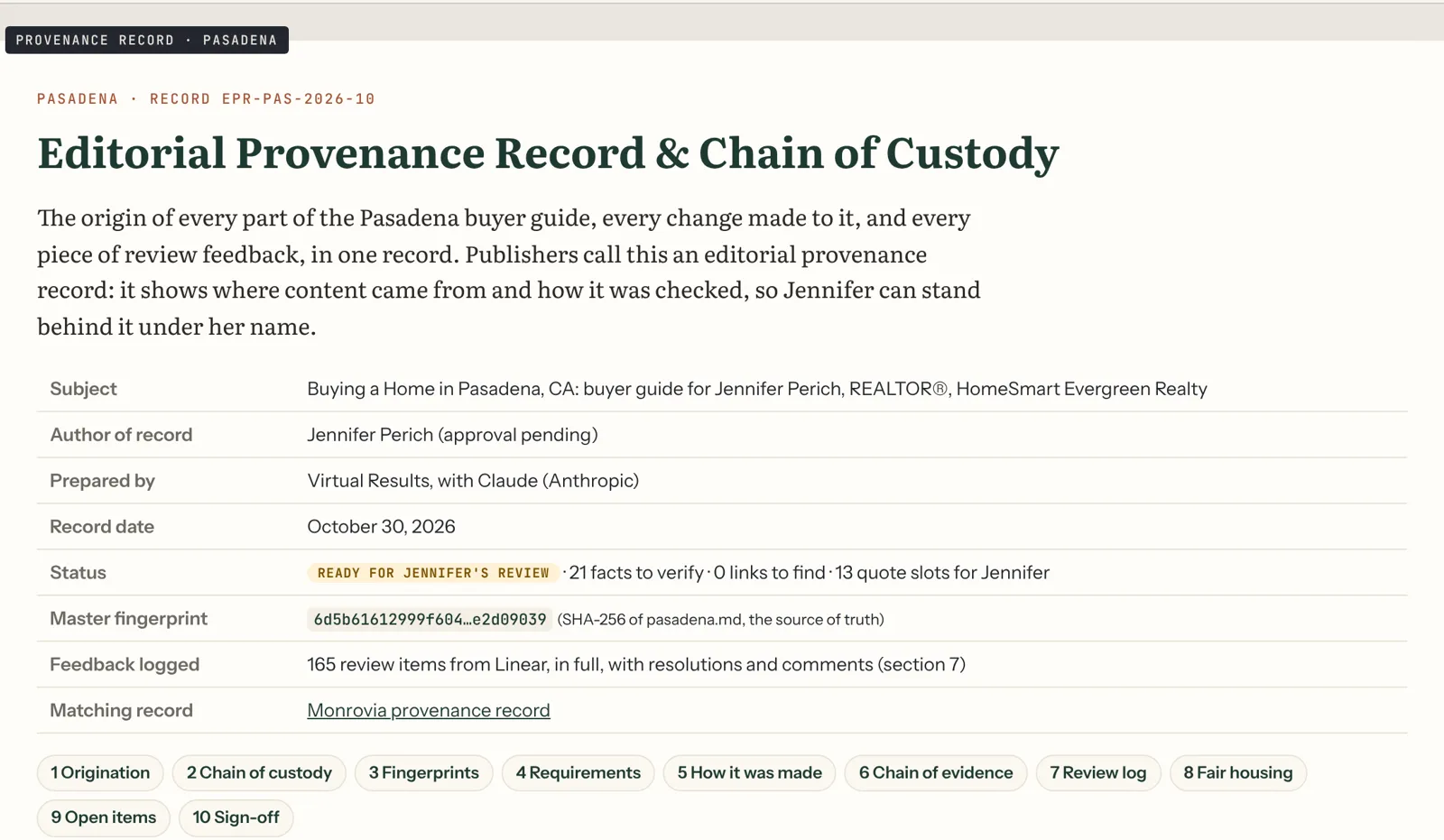
It all goes in the Provenance Record. Every guide comes with its own paper trail: where every word, fact, image and video came from, every review note and how it was resolved, the dates of each stage, and a digital fingerprint for every file. If your managing broker asks how the guide was made, hand them the Provenance Record. It answers their questions before they ask.
We’re open about how the guide is made. We use AI tools for research support, drafting and media, the same way a good newsroom uses software. People direct the work, check the facts and make the decisions, and the Provenance Record shows exactly who did what. We’d rather show our work than pretend there isn’t any.
Part 3: Live listings throughout
A guide that answers every question and then leaves the reader with nowhere to go is a missed opportunity. So we place live listings inside the guide, right where a buyer is reading about each area.
On a Virtual Results website, listings come straight from your MLS feed through our listings platform. In each neighborhood section, a small module shows current homes for sale in that area. In the home-styles section, a module can show current Craftsman homes, or current ranch homes, or whatever style the section covers. At the bottom, a full search lets the buyer browse everything in the city.
Two details make this work better than a generic search box:
- Real boundaries. Mailing addresses lie. Plenty of homes with a city’s name on the envelope are actually in an unincorporated part of the county, with different rules, taxes and services. Our guides explain this, and the listings modules are filtered to the city’s actual boundary where the feed allows it, so the homes shown match the section they’re in.
- Placement, not clutter. Each guide has a set number of listing spots (our two demo guides have them placed and waiting for the feed). They sit at natural stopping points, not between every paragraph.
If you’re not on a Virtual Results website, we can deliver the guide with clear instructions for placing your own listings widgets from whatever IDX provider you use.
Part 4: Live market stats throughout
Market numbers go stale fast. A guide that says “the median price is $1.2 million” is wrong within a quarter. So we don’t hard-code market numbers into the writing. We place live market modules that update themselves from your data feed.
Each module shows a small set of numbers for the city or a neighborhood: median price, days on market, number of active listings, and price per square foot. Each one carries a “Data as of” date and a short source line. The writing around it explains what the numbers mean for a buyer, in terms that won’t go out of date. Homes in the hills tend to sell for more per square foot, and the spread between the flats and the foothills is wide.
The market stats also feed the social calendar. On the first Monday of each month, a stats card for the city goes out on your social channels, linking back to the guide. It’s a small, steady signal that you know your market, and that the page is current.
Part 5: Your voice, from a 30-minute Zoom
Here’s the one thing no AI tool, no competitor and no national portal can produce: you, talking about your city.
Google’s guidance puts a lot of weight on first-hand experience. AI assistants look for it too. A page that says “the commute can be rough” is generic. A page where a local agent says “I tell every buyer to drive it at 7:30 on a Tuesday before they write an offer” is experience. It’s specific, it’s human, and it can’t be copied.
So every guide includes a short interview with you, on Zoom.
Before the call, we send you the questions. They come straight from the guide: the places where a buyer most wants a local’s opinion. What do buyers underestimate about hillside homes here? Which part of town surprises people? What do you tell someone moving from out of state? Our Pasadena and Monrovia guides each have a set of quote prompts placed in the draft, ready to be filled.
On the call, you just talk. Thirty minutes is usually enough to cover everything. We record audio and video (with your OK).
After the call, that one recording becomes four things:
- Written quotes in the guide. We write up your own answers, lightly edited for length. Nothing is published as your quote until you approve the exact words. We never invent a quote.
- Video clips. Twenty to forty seconds each, one per question, with captions. They go in the guide next to the matching quote, on your YouTube channel, and into the social calendar as reels and shorts.
- Audio clips. The same answers as short audio snippets, played right in the guide for readers who’d rather listen.
- An “Ask the agent” box with your name, photo and a short written answer, so the page carries your perspective even for readers who skip the media.
A Zoom interview turns out to be much more interesting than a printed quote alone. Buyers get to see and hear the person they’d be working with. And you only have to do it once.
Prefer to stay off camera? That’s fine. We can use audio only, or written answers you send us. You’ll get the most out of it on video, though.
Part 6: Search labels (schema)
Search engines read pages the way people do, but they also read a hidden layer of labels called structured data, or schema. Schema tells Google, in a format it can’t misunderstand, exactly what a page is and who stands behind it.
Each guide ships with a full set of these labels. Our Pasadena guide uses 27. They say things like:
- This is an article about buying a home in Pasadena, California, published on this date and last updated on that date.
- The author is a person, named Jennifer Perich, who is a real estate agent with this license number, at this brokerage, at this office address, with this phone number.
- She knows about these topics: Pasadena real estate, Monrovia real estate, probate sales.
- This page has a FAQ, and here are the questions and answers.
- This page has a video, with this title, length and transcript.
- This page has a breadcrumb trail from the home page to the guide.
- The business is a real estate agent serving these cities.
Two things make our schema better than the default output of a plugin:
It’s tied to the license. The author label links to the state’s public license lookup, so anyone (including a search engine) can confirm the person named is a licensed agent. That’s a strong, verifiable trust signal.
It matches what’s on the page. Schema that claims things the page doesn’t show is worse than none. Ours is generated from the guide itself and checked with Google’s own testing tools before launch.
Part 7: Answers written for AI assistants (ChatGPT, Claude)
Optimizing a page to be quoted by AI assistants is often called AEO, answer engine optimization (ChatGPT, Claude). It sounds new, but most of it is old-fashioned good writing, organized so a machine can lift a clean answer.
Here’s what we do in every guide:
- Question-shaped headings. Many section headings are the actual question a buyer asks. Is Monrovia in a fire zone? What school district is Pasadena in? Do I pay a transfer tax?
- The answer comes first. The first sentence under each question answers it in plain words. Details, exceptions and sources follow.
- Short, self-contained answers. Each answer makes sense on its own, without needing the paragraph above it. That’s what lets an AI assistant quote it accurately.
- Dates and sources inline. “As of 2026” and a link to the official source, right in the answer. AI assistants prefer answers they can attribute.
- A real FAQ. 10 to 15 common questions at the bottom, each answered in two or three sentences, and labeled with FAQ schema.
- A quick answer at the top. The opening summary is written to be the best possible one-paragraph answer to “What’s it like to buy a home in this city?”
- A clear author. Every answer sits on a page with a named, licensed local expert. When an AI assistant recommends an agent, that’s the kind of page it draws on.
Will ChatGPT or Claude name you the week the guide goes live? Nobody can promise that, and anyone who does is guessing. What we can do is build the page the way these systems choose pages, and then check. Every month, our Essentials and Grow plans include a check of whether the major AI assistants cite the guide or you when asked about your city, with a short results email.
Part 8: Maps and local search
Buyers search with places in mind, and so does Google. The guide is tied into your local presence in a few ways:
- Map embeds. Each neighborhood section can include a map so readers see where it is. The guide also includes original illustrated maps of the city’s buying areas, so the page isn’t just borrowed map tiles.
- Your name, address and phone, everywhere the same. We call this your NAP. It appears in the author box, the schema, the checklist footer and your Google Business Profile, character for character the same. Mismatched details across the web are one of the most common local search problems we see. Our optional listings cleanup service fixes them across about 45 directories.
- Google Business Profile. Your profile links to the guide, and the social calendar includes a Google Business Profile post for every blog post, so your profile stays active all year.
- Local place names. Neighborhoods, landmarks, streets, parks and transit stations are named the way locals name them, along with the official names, so the guide matches how people actually search.
Part 9: 98% original, checked by Copyscape
Copyscape is the plagiarism checker editors and publishers have used for two decades. You give it a page, or a block of text, and it searches the web for copies of any part of it. Then it compares the matches word by word and tells you exactly how much of your text appears anywhere else.
We ran both of our demo guides through Copyscape Premium in November 2026, checking every word.
| Guide | Words checked | Words found elsewhere on the web | Original |
|---|---|---|---|
| Monrovia | 7,299 | 158 | 98% |
| Pasadena | 9,948 | 66 | 99% |
And here’s what those few matching words were: official names and legal terms. “Fire Hazard Severity Zone.” “Hillside Wilderness Preserve.” “A contract to preserve and maintain,” which is the wording of the state’s Mills Act. “Exterior changes visible from the street,” which is the city’s own historic-preservation rule. Those phrases are supposed to match the official sources. You’d be making a mistake to reword them.
Not a single sentence of either guide was copied from another website.
Why this matters:
- It’s your page, not a copy. A guide stitched together from other agents’ blogs puts your name on someone else’s work.
- Search engines filter duplicates. When the same text appears in many places, search engines generally pick one version to show and filter out the rest. Original text doesn’t have that problem.
- It’s proof. Every guide we deliver gets its own Copyscape check before launch, and the result goes in the Provenance Record. You can show it to anyone.
We also check the guides against each other. If you buy guides for two neighboring cities, some topics overlap: the same county tax rules, the same state fire law. Rather than repeat those paragraphs, we write each city’s version with its own local details, and move truly shared material, like the glossary, to one shared page that both guides link to. That keeps your own site free of duplicate text, too.
Part 10: Original images, no stock photos

Stock photos are everywhere, and buyers have learned to scroll past them. Worse, they’re a licensing headache. So every image in a City Buyer Guide is made for that guide.
Our demo guides include:
- A painted hero image of the city’s skyline, mountains or main street, in a consistent illustrated style. It’s also animated as a short looping video for the top of the page and for social.
- A painting for each home style in the guide. Our Pasadena guide has seven, from Craftsman bungalows to Spanish Revival to mid-century homes.
- Illustrated maps of the city’s buying areas.
- Charts and graphics for things like the tax steps or the fire-zone categories, built so Google can read the text in them.
- Share cards for every blog post and section, sized for Instagram, Facebook and LinkedIn.
- The printable pre-offer checklist, with your name and contact details in the footer.
The paintings are made with AI image tools from our own prompts, then reviewed and refined by a person until they look right and match the real place. They’re labeled as illustrations, not photos, so no one mistakes a painting for a listing. Every image file has a descriptive name and alt text, and every one is recorded in the Provenance Record with how it was made.
The images also do quiet work for you. A good painting of a local landmark is the kind of thing a neighborhood association or local blog is glad to share, with credit and a link back. More on that in Part 16.
Part 11: Video, on your YouTube and on the page
YouTube is the second-largest search engine in the world, and Google shows videos right in its search results. So every guide comes with video.
- A narrated video tour. About two minutes, using the guide’s paintings, maps and graphics, narrated in a clear, warm voice. It covers what the city is like, the main buying areas and the questions buyers should ask.
- A short reel. Twenty seconds, vertical, made for Instagram Reels, YouTube Shorts and Facebook.
- Your interview clips. From Part 5, captioned and cut into short answers.
We upload the videos to your YouTube channel with full titles, descriptions, chapters and captions, each one linking back to the guide. Then we embed them on the guide itself, with video schema and a transcript. A reader who’d rather watch than read can, and the transcript gives search engines the words.
If you don’t have a YouTube channel yet, we’ll help you set one up in your name. The channel and the videos are yours.
Part 12: The city podcast
This is the part buyers don’t expect, and the part they share.
Every guide comes with a two-host audio conversation about the city: about 15 to 25 minutes of two voices talking through what it’s like to buy there. What the neighborhoods are like, what catches buyers by surprise, how the commute really works, and what’s coming next. It’s scripted from the guide’s own research, so every fact in it is one we’ve already checked.
The two hosts are AI-generated voices, and we say so in the episode description and on the page. If you’d like to be a guest, we can record you on Zoom and add a short segment in your own voice. That’s even better, because it puts you in the conversation.
The podcast goes in three places:
- On the guide, as an audio player with a transcript.
- On your YouTube channel, as a full-length video with the guide’s paintings on screen, chapters and a link back to the guide.
- As a download, so buyers can save it for the car. You can also send it to past buyers and sellers, share it with your sphere, or hand it to relocating buyers as a welcome.
Why it works: buyers relocating from somewhere else want to understand a place before they visit, and many of them would rather listen on a drive than read 10,000 words. The podcast reaches them, and every listen is time spent with your city’s story and your name.
Part 13: Listen: the whole guide, read aloud
Every guide on a Virtual Results website gets a Listen button at the top. Press it, and the whole guide is read aloud in a natural voice. It’s good for accessibility, it’s good for readers on the go, and it keeps people on the page longer.
On top of the full narration, we cut short audio snippets for key sections, like the quick answer, the fire-zone summary and the tax steps, each one or two minutes long. They sit right in their sections and they’re easy to share on their own.
Together with the podcast and your interview audio, a buyer can get almost everything in the guide without reading a word. Many won’t need to, but the ones who do will appreciate it.
Part 14: 24 blog posts, all live on launch day
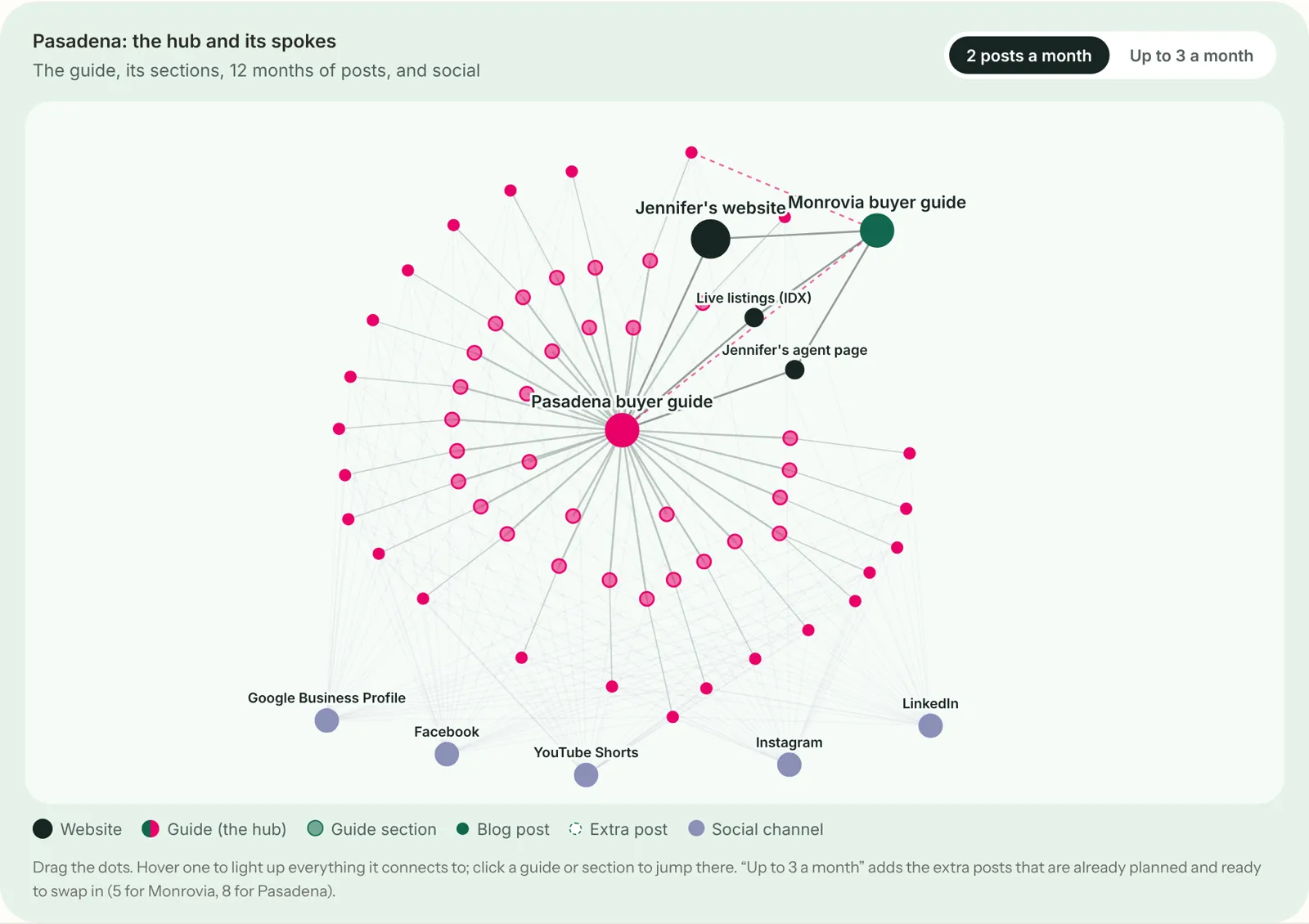
The guide is the hub. The blog posts are the spokes.
Each guide comes with 24 blog posts. Every post takes one section of the guide and goes deeper from its own angle. One post covers each neighborhood. One covers each home style. The rest cover the topics buyers search for most: property taxes, supplemental tax bills, fire zones and insurance, backyard cottages, school boundaries, the commute, historic homes, rent rules, “unincorporated” addresses, and how the city compares to its neighbors.
Each post:
- Targets a real search. “Craftsman homes for sale in Pasadena.” “Is Monrovia in a fire zone.” “Supplemental tax bill Los Angeles County.” We plan each post around what buyers actually type.
- Links to the guide in its first paragraph, straight to the matching section. And that section of the guide gets a one-line “Go deeper” link back to the post.
- Cross-links the neighboring guide where buyers compare cities. Our Monrovia commute post also links the Pasadena guide, and the other way around.
- Follows the same rules as the guide: sourced, dated, plain-spoken and fair-housing safe.
- Gets its own Copyscape check before it publishes.
All 24 posts go live with the guide on launch day. There’s no reason to make search engines wait a year to see the whole picture. When the guide launches, Google finds a complete, tightly linked set of 25 pages about your city at once, and every one of them is working from day one. A plan with extra posts is also ready, if you’d like to add more over the year. Our demo plans have 5 extras for Monrovia and 8 for Pasadena.
Part 15: A full year of social media
The posts all go live on day one. The social media rolls out across the whole year.
Each guide comes with a 12-month social calendar, scheduled in advance. Every blog post gets three social moments:
- A share card on Instagram, Facebook and LinkedIn, with a painting from the guide and a one-line hook.
- An interview clip, two days later, with you answering that post’s question in 20 to 40 seconds. It goes out as an Instagram Reel, a Facebook video, a LinkedIn video and a YouTube Short.
- A Google Business Profile post at the end of the week.
On top of that:
- A market stats card goes out on the first Monday of each month, with the “Data as of” date.
- Local moments go out on the dates buyers care about: property tax due dates, school enrollment windows, insurance renewal season, and local events like the Rose Parade or a historic home tour.
That’s well over 100 scheduled posts across the year, every one linking back to a blog post or the guide. You don’t have to think about it. It just keeps showing up, so your name stays connected to your city all year.
Want to post in your own voice too? Go ahead. The calendar is a floor, not a ceiling.
Part 16: Local links, out and in
Links between websites are still one of the strongest signals search engines use, and local links are the hardest kind to fake. This part has two halves.
Links out: local credibility
A guide that only links to government websites reads like a government website. A guide that also links to the places locals love reads like a local wrote it. So every guide links out to real local establishments and organizations, where it helps the reader:
- Neighborhood and preservation groups, like neighborhood associations, historical societies and home tour organizers.
- Parks, trails and nature preserves, with hours and rules.
- Main street business districts and their event calendars.
- Libraries, community centers and farmers markets.
- Local news sources, so buyers can follow what’s happening.
- Long-standing local institutions, like independent bookstores and theaters, where the guide mentions them.
We never accept payment for these links, and we don’t describe businesses as “the best.” We describe what’s there, so the guide stays useful and trustworthy.
Links in: how to earn real local links back
This is the question every agent asks, and the honest answer is that there’s no button for it. You earn real local links by being genuinely useful to local organizations and local media. The good news is that a City Buyer Guide gives you a lot to offer. Here’s what works, roughly in order of effort:
- Your own profiles first. Your Google Business Profile, your brokerage agent page, your Zillow and Realtor.com profiles, your local REALTOR® association profile, and every social bio should link to the guide. These are links you control, and they take an afternoon.
- The local chamber of commerce. Most chambers list members in an online directory, usually with a link to your website, and many offer ways to feature members in newsletters, magazines and social posts. The Pasadena Chamber of Commerce, for example, lists members in its online and printed directory and offers member features. Membership costs money, but it’s also a networking group full of local business owners who know buyers.
- Tell the places you featured. When the guide mentions a park conservancy, a historical society, a farmers market or a business district, let them know. Send them the section and the share card. Some will share it, and some will link to it from a “Press” or “In the news” page. It costs nothing to ask.
- Offer your paintings. Original paintings of local landmarks and home styles are genuinely useful to neighborhood associations, home tour organizers and local bloggers. Offer them for free use with a credit and a link back to the guide. This is one of the most natural link offers there is.
- Sponsor something local. Historic home tours, school foundation events, youth sports leagues, community runs and street fairs usually list sponsors on their websites, often with a link. Pick one or two that you actually care about. It’s good for the community and good for your name.
- Become the local source for reporters. Local news sites and newspapers write about housing all the time. Pitch your monthly market stats to them as a short, dated summary. When they need an expert, a licensed agent with a well-sourced guide is an easy call. Sign up as a source on services like Qwoted, Featured (which now runs HARO) and Source of Sources, and answer requests about your city and your specialties.
- Guest on local media. Local podcasts, community radio and neighborhood newsletters want guests who know the city. Your guide and your podcast are your credentials.
- Invite local voices onto your podcast. A short guest segment with the director of the local historical society, or the owner of a long-standing local business, gives them a reason to share the episode and link to it.
- Partner with local pros. Inspectors, contractors, insurance agents, lenders and stagers often have “resources” pages. Your guide is a better resource than most. Offer to link to them where it genuinely helps your buyers, and ask if they’d like to list the guide for theirs.
- Citations. Your business listing on the major directories, data aggregators and real estate sites, with your name, address and phone identical everywhere. Many of these links don’t pass much authority on their own, but consistent citations strengthen your local presence. This is what our listings cleanup service does.
What we won’t do: buy links, swap links in bulk, use private link networks, or post spammy guest articles. Google’s spam policies forbid link schemes, and they put the whole site at risk. Real local links come slowly. A handful of genuinely local links in the first year, from your chamber, a neighborhood group, a sponsor page and a local news site, is a real win, and worth far more than hundreds of junk links.
Our Local links add-on does this work for you each quarter: we find the opportunities in your city, write the outreach, send you the ones that need your signature, and track what lands.
A walk through a real guide: Pasadena
It’s easier to understand all of this by seeing it in one real guide. Here’s what a buyer experiences on our Pasadena demo, built for Jennifer Perich, from the top of the page to the bottom.
At the top, a painted image of the San Gabriel Mountains above the city’s rooftops, gently animated. Below it, the title, Buying a Home in Pasadena, CA: Neighborhoods, Schools & Commute, and a byline with Jennifer’s name, license number and brokerage, and the date it was last updated. A Listen button sits right there, and so does the two-minute video tour.
Then the quick answer. Four sentences that sum up Pasadena for a buyer: a mid-sized city with deep historic neighborhoods, a wide spread of prices from the flats to the hills, real fire-zone and insurance considerations near the foothills, and the Metro A Line running through it. It’s written so that if an AI assistant quotes only this paragraph, the buyer still gets an accurate picture.
Then the table of contents, and the neighborhoods. Bungalow Heaven. The San Rafael Hills and Linda Vista. The Caltech area, Millionaire’s Row and Oak Knoll. Hastings Ranch. Northwest Pasadena, Historic Highlands and Garfield Heights. The South Pasadena border areas. Old Pasadena, Playhouse Village and central Pasadena. Plus a section on “Pasadena” addresses that aren’t actually in the City of Pasadena. Each one has approximate boundaries, the home styles you’ll see, what to check before an offer, a live listings module for that area, and a “Go deeper” link to its own blog post. There’s a comparison table, so a buyer can see at a glance how the areas differ in home types, lot sizes and the rules that apply. Not who lives there. What’s there.
Then home styles, each with its own painting. Craftsman bungalows, Spanish Revival, Tudor, mid-century modern, and more. For each style: what to look for, what usually needs work, and what historic-district rules might apply.
Then the practical heart of the guide. Schools, by district boundary, with the official lookup tool. The commute, with the 210, the 110 Arroyo Seco Parkway (and its tight, old-fashioned on-ramps), and the A Line stations. Property taxes, supplemental tax bills and Pasadena’s presale certificate (a city inspection requirement when a home is sold), explained step by step. Wildfire risk after the Eaton Fire, and insurance, including what the FAIR Plan covers and doesn’t. Rent rules for buyers of rental property. Backyard cottages and lot splits. Each section has its sources linked inline, and many have a short audio snippet.
Woven through all of it, Jennifer’s own answers: the things she tells buyers that you won’t find in any database, with a video clip of her saying them.
Near the end, the Rose Parade and Rose Bowl event days, because living on the parade route is a real consideration that no national site explains. Then “What’s changing,” with dates. Then the printable pre-offer checklist with Jennifer’s name and contact details. Then the glossary, the FAQ and the full source list.
Around the page, 24 blog posts linking in, a year of social posts pointing back, the podcast on YouTube, and the schema telling search engines exactly who wrote it and why she’s qualified.
That’s the whole system, working on one page.
The Expertise X-ray
We built one more thing for the agents we work with, because we know all of this is a lot to take in.
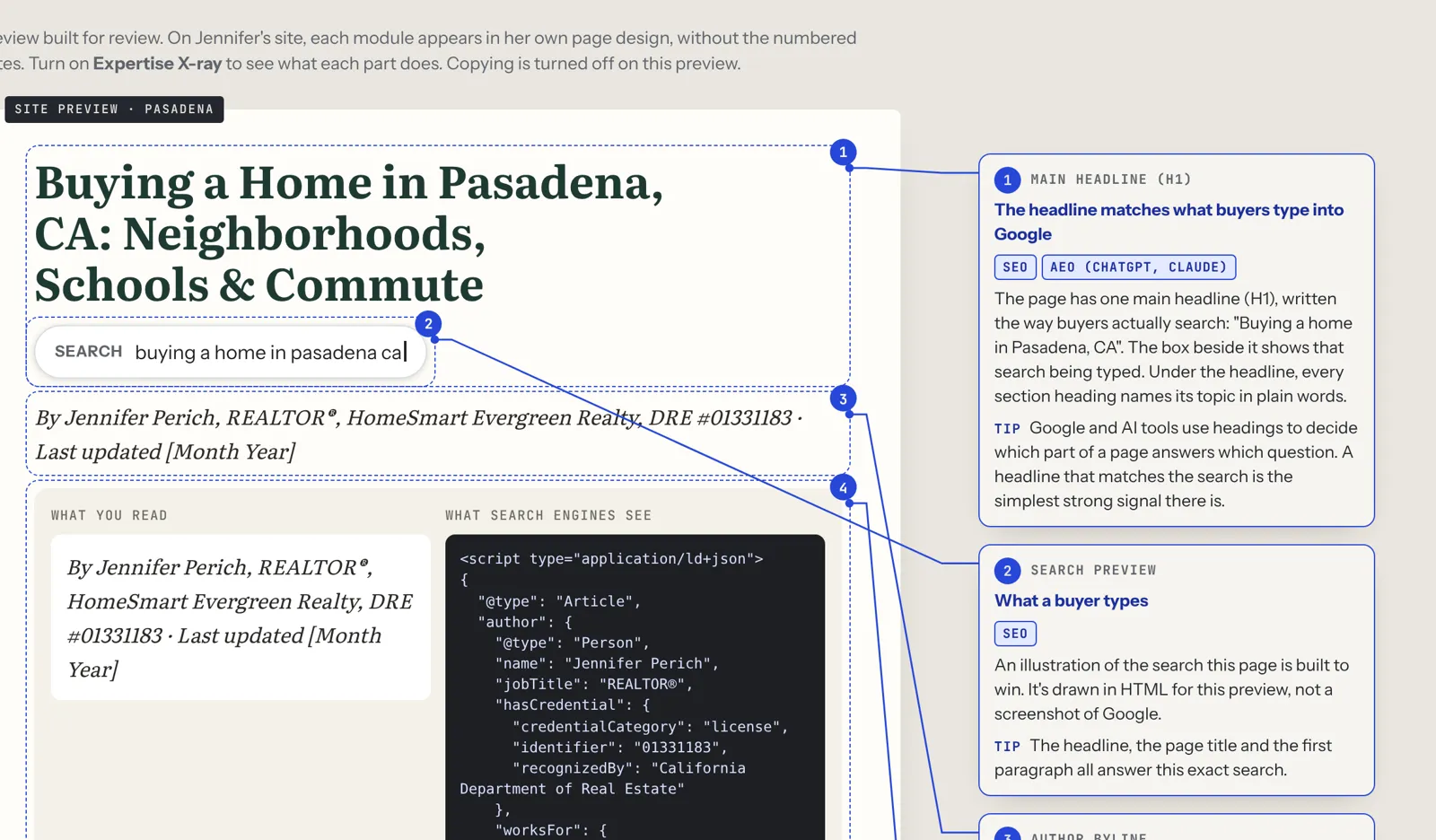
Every preview has a switch at the top called Expertise X-ray. Turn it on, and numbered notes appear in the margin next to each part of the page. Each note explains what that part does and who it’s for, tagged by what it helps:
- SEO: helps the page rank in Google search.
- AEO: helps AI assistants (ChatGPT, Claude) quote the page.
- E-E-A-T: shows experience, expertise, authority and trust, which Google’s guidelines emphasize.
- Local: ties the page to your local presence.
- Buyer: helps the reader directly.
It’s the fastest way to understand why the guide is built the way it is. Most agents tell us it’s also the fastest way to explain it to their broker.
How it works, step by step
From your first email to a live guide takes about two to three weeks. Here’s the whole process.
Day 1: Pick your city. Tell us the city, your specialties, and the name, address and phone you use everywhere. We check that the city isn’t already taken by another agent. We only build one guide per city.
Days 1–5: Research and draft. We gather the official sources, map the neighborhoods and write the first draft. Anything we can’t confirm gets a VERIFY tag.
Days 5–7: Independent review. A second review goes over the risky claims: taxes, fire zones, insurance, schools, rules and numbers. Every note gets resolved and logged.
Day 7: Your Zoom interview. Thirty minutes. We send the questions ahead. You talk; we record.
Days 7–12: Media. Paintings, maps, the video tour, the reel, the podcast, the Listen narration and your interview clips. We write up your quotes and send them for approval.
Days 12–14: Your preview. You get a private preview link with an Expertise X-ray switch. Flip it on, and numbered notes explain what every part of the page does for Google, for AI search and for buyers. You also get the Provenance Record and the short list of facts to confirm.
Launch day. We publish the guide and all 24 blog posts on your website, connect the listings and market stats, add the schema, upload the videos to YouTube, run the final Copyscape check and schedule the year of social.
Every month after. On the Essentials or Grow plans, we refresh the facts each quarter, watch the listings and stats, and send you a short results email that includes your search performance and whether AI assistants are citing the guide.
Do it yourself: the full recipe
We think you should know exactly what goes into this, even if you never hire us. Here’s every step, the tools we’d use, what they cost and how long each step takes someone who already knows the tools. Prices are list prices as of November 2026. Check them before you buy, since they change often.
| # | Step | Tools | Tool cost | Hours |
|---|---|---|---|---|
| 1 | Research the city and outline the guide | ChatGPT Plus or Claude Pro (1 month) | $20 | 7 |
| 2 | Write and edit 7,500–11,000 words | Same AI assistant, plus a written style guide | Included | 10 |
| 3 | Fact-check every claim against official sources, and do a second review | Official websites, a spreadsheet | $0 | 4 |
| 4 | Check originality | Copyscape Premium (about 1¢ per 100 words) | $5 | 1 |
| 5 | Make the paintings, maps and share cards | Higgsfield Plus (1 month) | $59 | 5 |
| 6 | Make the narrated video tour and the reel | Higgsfield, plus ElevenLabs Creator for the voice (1 month) | $22 | 4 |
| 7 | Interview the agent and cut the clips | Zoom, a video editor; HeyGen Creator if you want an AI avatar of the agent (1 month) | $29 | 3 |
| 8 | Make the two-host city podcast | NotebookLM (free; Google AI Pro is $19.99 a month for higher limits) | $20 | 2 |
| 9 | Record the Listen narration and audio snippets | ElevenLabs (same subscription) | Included | 1.5 |
| 10 | Add schema, AEO answers and local SEO | A free SEO plugin, Google’s Rich Results Test | $0 | 2.5 |
| 11 | Place the listings and market stats modules | Your IDX and market stats provider (not counted, since you need them anyway) | — | 2 |
| 12 | Build the page on your site and publish | WordPress | $0 | 3 |
| 13 | Write 24 matching blog posts | AI assistant, Copyscape | $10 | 12 |
| 14 | Upload videos and the podcast to YouTube | YouTube | $0 | 2 |
| 15 | Schedule a year of social media | Buffer Essentials, 4 channels for a year | $240 | 6 |
| 16 | Start local link outreach | Email, time (chamber dues and sponsorships extra) | $0 | 3 |
| Total | $405 | 68 hours |
At $25 an hour, what you’d pay a capable assistant, those 68 hours are worth $1,700. Add $405 in tools, and the do-it-yourself cost of one complete city guide is about $2,100. At your own hourly rate as an agent, it’s a lot more.
That estimate also leaves out three things that take real time:
- Learning the tools. Every tool above has a learning curve. The first guide always takes far longer than the hours shown.
- The rule book. Our 52 editorial rules, fair-housing checks and review process took a long time to build. You’ll need your own.
- Ongoing tools. An IDX feed (IDX Broker starts at $60 a month, for example) and a market stats source cost money every month. You may already have them. Virtual Results websites include listings.
You can absolutely do this yourself, and this recipe will get you there. If you’d rather spend those 68 hours with buyers and sellers, that’s what we’re for.
Fair housing, built in
This part matters to your license, so it gets its own section.
Instant AI tools are now writing neighborhood pages from a ZIP code in seconds, and some of them even target buyers by type: “great for young families,” “perfect for retirees.” That’s exactly the kind of steering fair-housing rules forbid.
Every City Buyer Guide describes places, never people. We write about homes, lot sizes, prices, rules, commutes, parks, shops and hazards. We never describe who lives in a neighborhood, who it’s “good for,” or what kind of person would fit. Schools are covered by district boundaries and official lookup tools, never rankings or descriptions of students. Every guide is checked against a written fair-housing rule set, and the check is recorded in the Provenance Record.
It’s a careful review, not legal advice. Your brokerage’s policies always come first, and you approve the guide before anything goes live.
What we need from you
Not much:
- Your city and your specialties (probate, first-time buyers, luxury, investors, whatever you’re known for).
- Your name, address and phone exactly as you want them to appear everywhere, plus your license number and brokerage.
- Thirty minutes on Zoom for the interview.
- A quick fact check of the items we tag for you.
- Access to your website and YouTube channel, or the name of your web person.
That’s it. We do everything else.
What it isn’t
We’d rather be clear up front.
- It isn’t a ranking guarantee. Nobody can honestly promise a position on Google or a mention by an AI assistant. We build the page the way these systems say they choose pages, and we track how it performs.
- It isn’t hands-off forever. Cities change. Rules change. The guide needs a refresh every quarter to stay accurate. Our monthly plans handle that, or you can do it yourself.
- It isn’t hidden AI. We use AI tools throughout, and we say so. The podcast hosts are AI voices, the paintings are made with AI image tools, and people check all of it. The Provenance Record shows exactly how every piece was made.
- It isn’t a substitute for you. The guide makes your expertise visible. It doesn’t replace it.
Measuring results
A guide is an investment, so you should be able to see what it’s doing. Here’s what we track, and what we’ve learned to expect.
What we measure:
- Search Console. Before launch, we record a baseline in Google Search Console. After launch, we watch which searches the guide and its posts appear for, how often they’re shown, how often they’re clicked and their average position.
- Traffic and time on page. How many people read the guide, how far they scroll, and how long they stay, including how many press Listen or play the video.
- Leads. Listing views, saved searches, contact forms and calls that start from the guide or its posts.
- AI citations. Once a month, we ask the major AI assistants the questions buyers ask about your city, and note whether they cite your guide or name you.
- Links. New links to the guide from other websites, especially local ones.
What to expect:
- The first month is mostly Google discovering and testing the pages. Impressions usually start before clicks.
- Months two through six are when long, specific searches start to land: “supplemental tax bill after buying a home in Pasadena,” “is my address in unincorporated Monrovia.” These searches are small one by one, but there are thousands of them, and the people typing them are serious.
- After six months, the guide’s age, its links and its steady updates start working together. This is where a well-maintained guide pulls away from pages that were published once and forgotten.
Search takes time. Anyone who tells you otherwise is selling something. What we can tell you is that a page like this is built to keep getting better with age, as long as it’s kept current.
Pricing
| Regular | Founding rate (first 10 agents) | |
|---|---|---|
| Complete City Package: the guide, 24 blog posts live on launch day, video tour and reel, city podcast, Listen audio, your interview clips, a year of scheduled social, Copyscape check and Provenance Record | $1,199 | $899 |
| Guide only: the full guide with paintings, video tour, audio, schema, sources, fair-housing check, Provenance Record and the 12-month plan | $699 | $499 |
Optional add-ons
- Listings cleanup, $795 one time. Your name, address and phone made identical on about 45 directories, from Google to Zillow.
- Local links, $249 a quarter. We find local link opportunities in your city, write the outreach and track what lands.
- Essentials, $99 a month. A quarterly refresh of the guide, the monthly stats card, listings watched, and a monthly results email, including an AI-citation check.
- Grow, $199 a month. Everything in Essentials, plus one new blog post a month.
One guide per city, per agent. Once a city is taken, it’s taken.
Words used on this page
If some of the terms in this article were new, here’s what they mean.
AEO (answer engine optimization): writing and labeling a page so AI assistants (ChatGPT, Claude) can find a clear answer in it and quote it accurately.
Copyscape: a plagiarism checker that searches the web for copies of a page or a block of text, and reports how much of it appears anywhere else.
E-E-A-T: experience, expertise, authoritativeness and trust. The qualities Google’s guidelines ask its quality raters to look for in a page and its author.
Google Business Profile: your free business listing on Google Search and Google Maps.
Hub and spoke: one main page (the hub) with many related pages (the spokes) that each go deeper on one topic and link back to the hub.
IDX: the system that shows MLS listings on an agent’s website.
Long-tail search: a long, specific search, like “Craftsman homes in Bungalow Heaven under $1.5 million.” Each one is searched less often, but there are many of them and they convert well.
NAP: your name, address and phone number. Search engines compare it across the web, so it should be identical everywhere.
Provenance Record: the paper trail we deliver with every guide, showing where every fact, word, image and video came from, every review note, and a fingerprint for every file.
Schema (structured data): hidden labels in a page’s code that tell search engines exactly what the page is, who wrote it and what it contains.
VERIFY tag: a marker in our drafts on any fact that needs checking before launch, with a note saying exactly what to check and with whom.
Questions agents ask us
What is a City Buyer Guide?
It's one long page on your website, 7,500 to 11,000 words, that answers everything a buyer asks about one city, under your name and license. Around it we build live listings, market stats, your interview, original paintings, video, a podcast, audio narration, 24 blog posts and a year of social media.
How original is the writing?
Our two demo guides scored 98% and 99% original on Copyscape. The only matches were official names and legal terms. Every guide we deliver gets its own Copyscape check before launch.
Do you use AI?
Yes, and we say so. We use AI tools for research support, drafting, paintings, voices and video. People direct the work, check every fact against official sources, and make every decision. The Provenance Record shows exactly how each piece was made.
Do you write my quotes for me?
No. We interview you on Zoom and write up your own answers. Nothing is published as your quote until you approve the exact words.
Will it rank on Google?
Nobody can promise a ranking. We build every guide the way Google and AI assistants say they choose pages: direct answers, official sources, a named licensed author, original content and regular updates. We track the results every month on our plans.
Will ChatGPT or Claude mention me?
We can't promise that either. We write the answers to be quoted, label the page with schema and tie it to your license. On our monthly plans, we check every month whether the major AI assistants cite the guide or you.
Why publish all 24 blog posts at once?
So search engines see the complete picture on day one: the guide plus 24 tightly linked pages about your city. The social media then rolls out over 12 months, so you stay visible all year.
How long does it take?
About two weeks from your interview to a finished preview, and a few more days to launch.
What if I don't want to be on video?
You can do the interview audio only, or send written answers. Video gets the most out of it, but it's your call.
Can I edit the guide later?
Yes. It's a page on your own website. Our plans can keep it current for you.
Do I need a Virtual Results website?
No. We can deliver the guide for any WordPress site, with instructions for your web person. On a Virtual Results website, the listings, market stats and Listen audio are built in.
What about fair housing?
Every guide describes places, never people, and is checked against a written fair-housing rule set. It's a careful review, not legal advice. Your brokerage's policy governs.
Can two agents get the same city?
No. We build one guide per city, per agent.
Can I see a real one?
Yes. Our demo guides for Monrovia and Pasadena were built for Jennifer Perich, REALTOR®, HomeSmart Evergreen Realty, and are shown with her permission.
Pick your city
Ten founding spots, at $899 for the Complete City Package or $499 for the guide alone. Tell us your city. We’ll confirm it’s open, and send you a short plan and a time for your interview.
Send us your city through our contact form. We’ll confirm it’s open and reply within one business day with a short plan and a time for your interview.